
USDT Top Up at LUCKYTOWN PLUS - Your Crypto Gateway
Why USDT is a Smart Choice for Your LUCKYTOWN PLUS Account
Effortless Digital Currency Integration
LUCKYTOWN PLUS embraces the future of finance by integrating USDT deposits. This stablecoin offers a bridge between the crypto world and your gaming experience, allowing for near-instant transfers with minimal network fees, giving you more control over your funds.
Broad Compatibility with Leading Wallets
No matter your preferred crypto hub, LUCKYTOWN PLUS is designed to work with it. Whether you manage your assets on Binance, Huobi, or any other personal wallet that supports the TRC20 network, the process remains smooth and straightforward.
Streamlined Verification and Processing
We know your time is valuable. Once your USDT transfer is confirmed on the blockchain and you've provided your transaction hash, our finance team ensures the corresponding MYR value is added to your balance within 10 minutes, minimizing any waiting time.
Real-Time, Fair Conversion Rates
Transparency is key. The USDT to MYR conversion rate is displayed clearly before you confirm your top-up. This rate is updated dynamically to reflect market movements, ensuring you receive a fair and accurate value for your deposit.
How to Deposit USDT into Your LUCKYTOWN PLUS Wallet

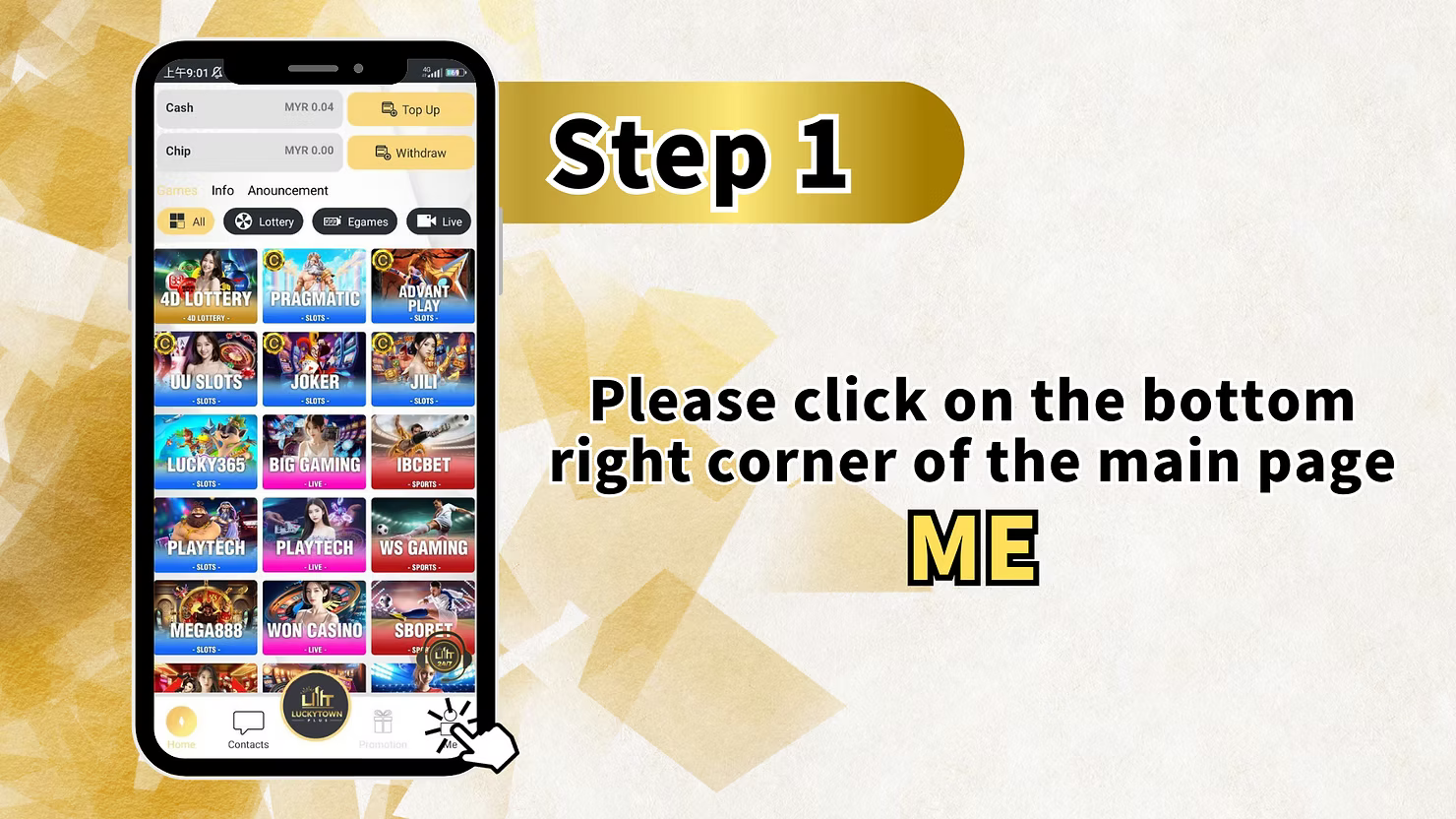
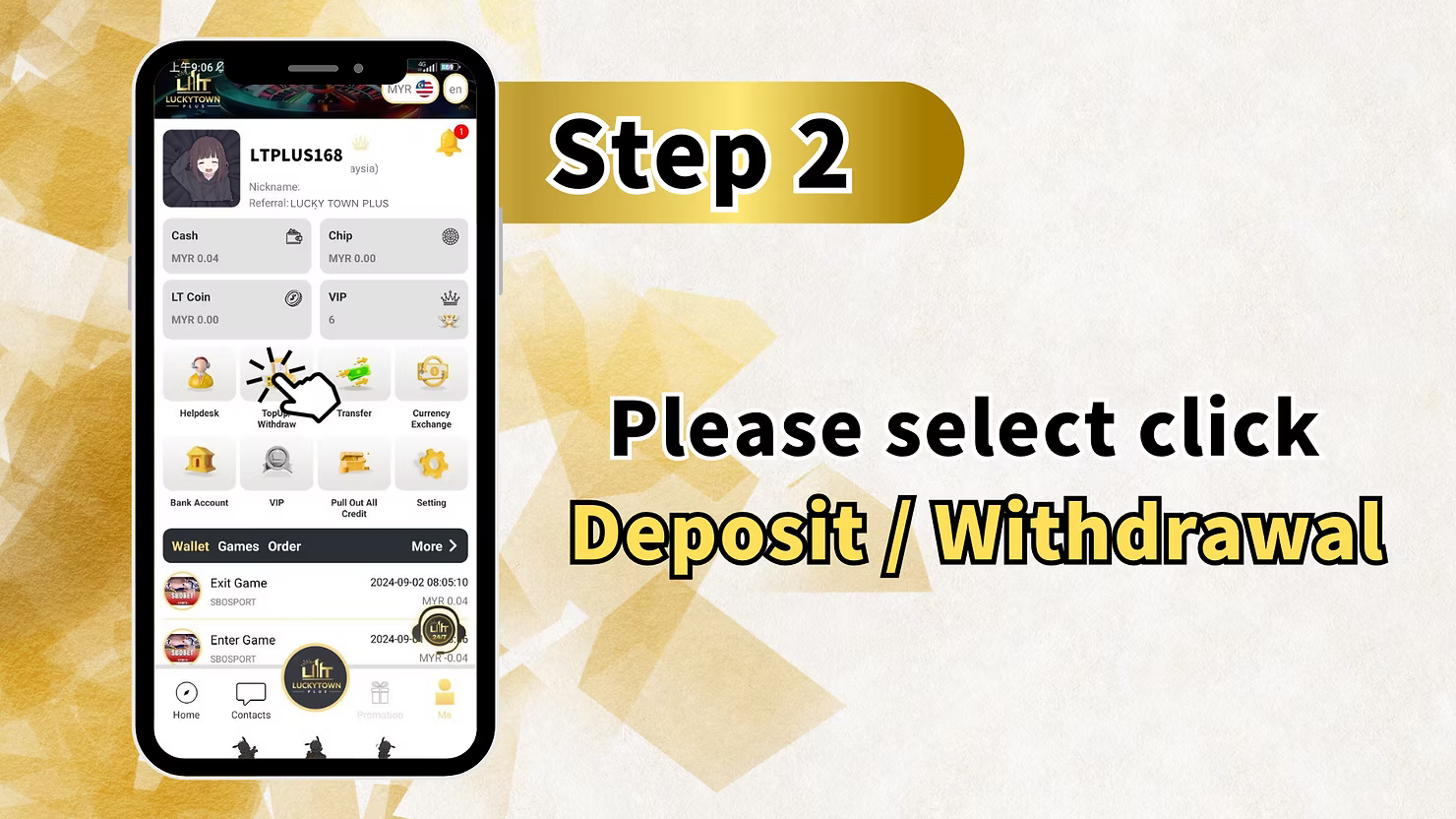
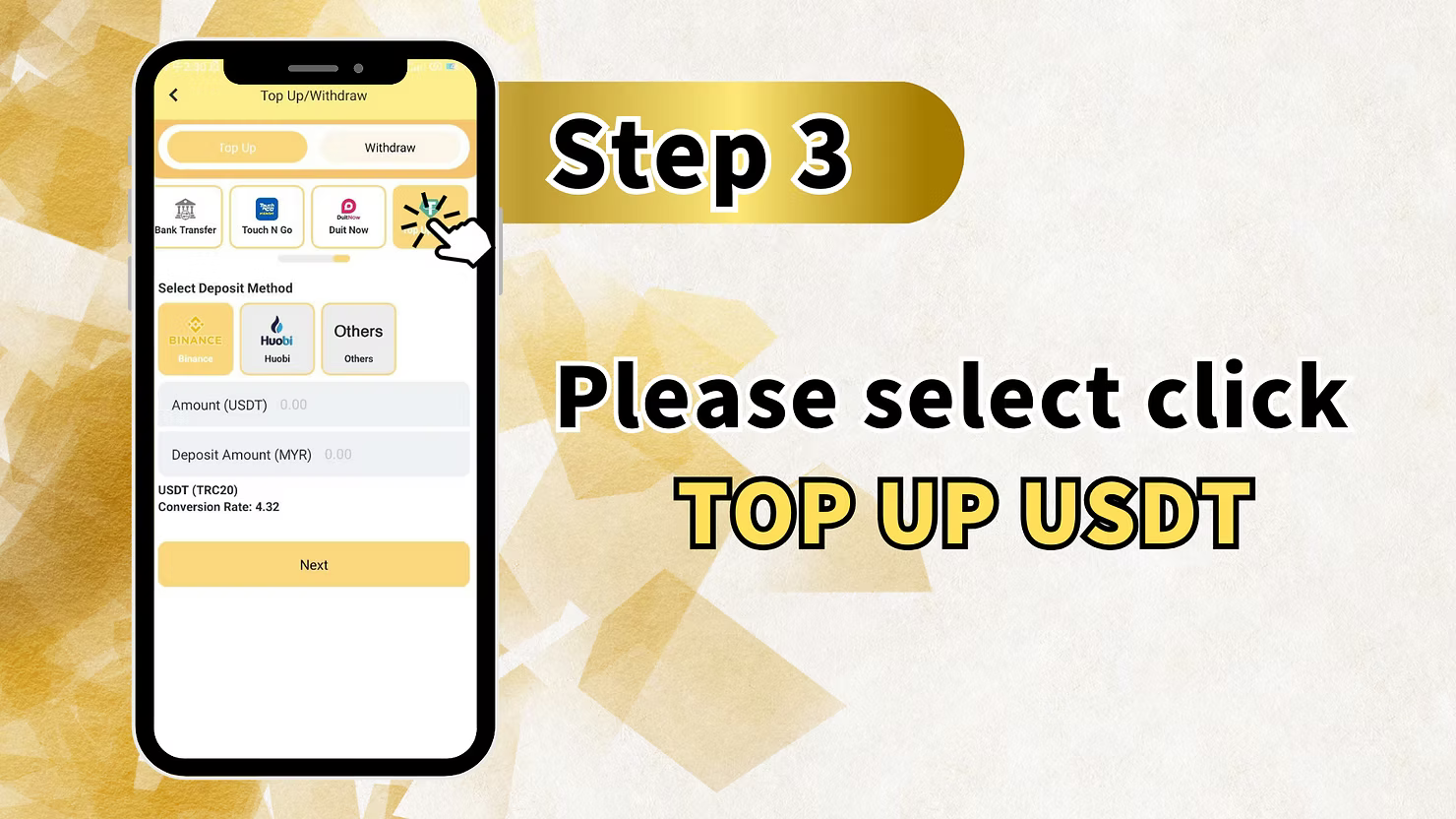
Step 1: Enter Your Account Hub
Tap the Profile Icon
Launch the LUCKYTOWN PLUS app. On the home screen, find and tap the profile icon located at the bottom-right corner. This action opens your personal account center, where you can manage all your settings and funds.
Step 2: Go to Your Financial Dashboard
Select "Deposit / Withdrawal"
Within your account center, tap on the "Deposit / Withdrawal" option. This will bring you to the financial dashboard, where you can view your balance and initiate both deposits and withdrawals.
Step 3: Initiate a USDT Deposit
Pick the USDT Payment Method
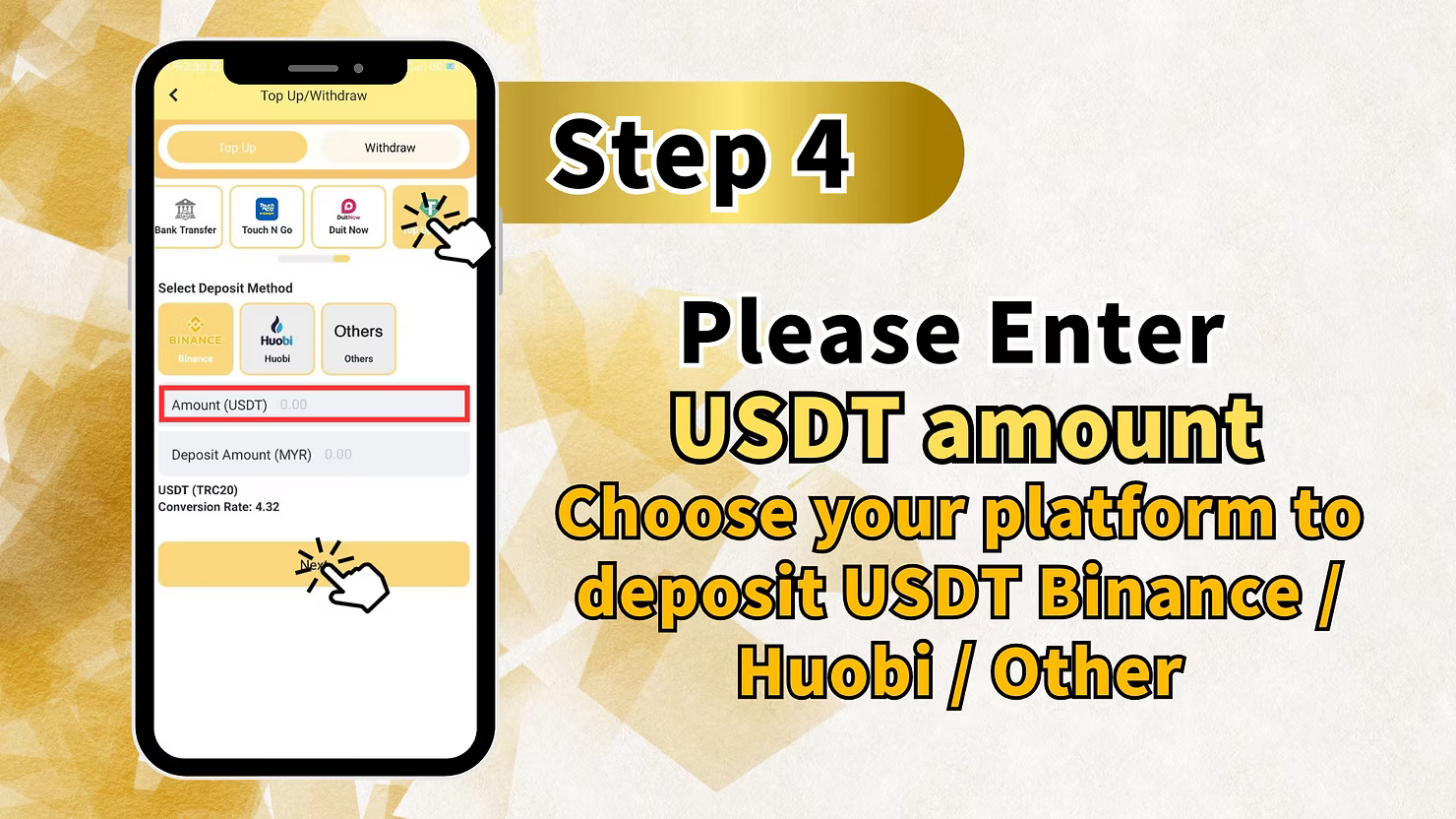
From the list of available deposit methods, scroll to and select the USDT section. You will then be prompted to choose the platform you are sending from:
- Binance - For users sending from a Binance account.
- Huobi / HTX - For users sending from a Huobi or HTX account.
- Other Wallet - For deposits from any other personal crypto wallet.
Specify Your Deposit Amount
In the provided field, input the amount of USDT you wish to deposit. As you type, the system will automatically calculate and display the equivalent amount in MYR based on the current exchange rate.
Proceed to the Next Step
After confirming the platform and the amount, tap the "Next" button to generate your personalized deposit address.
Step 4: Verify Your Deposit Request
Double-Check the Details
Before generating the payment details, a summary screen will appear. Take a moment to review the platform you selected and the total USDT amount. This is your final chance to ensure everything is correct before proceeding.
Step 5: Transfer and Submit Your Transaction ID
Scan the QR Code to Send Funds
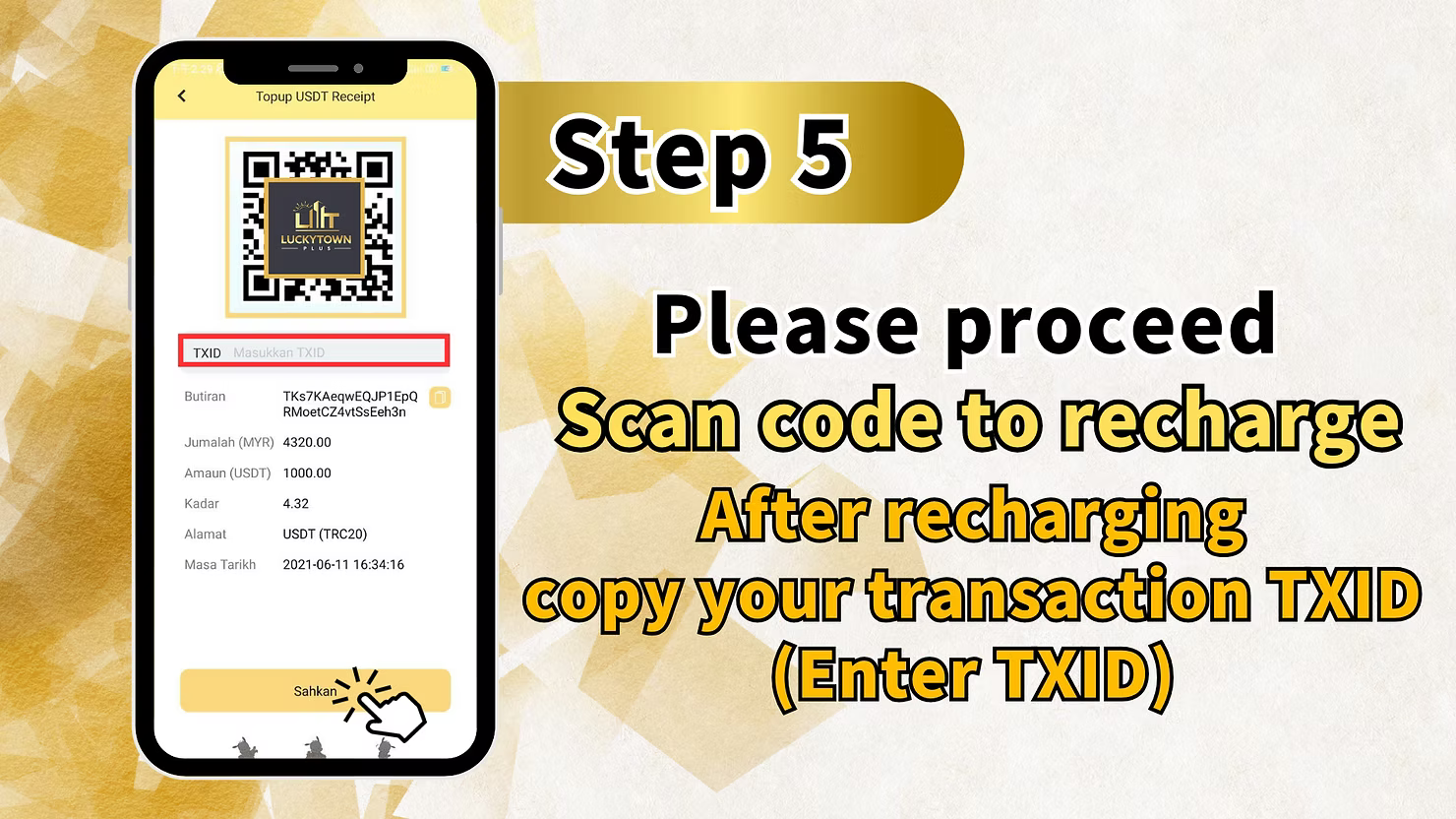
LUCKYTOWN PLUS will now display a unique QR code containing the deposit address. Open your crypto wallet, such as Binance, Huobi, or Trust Wallet, and use its send or scan function to capture this QR code. Complete the transfer for the exact USDT amount you specified.
Copy Your Transaction Hash (TXID)
Once the transfer is successful, your wallet app will provide a Transaction Hash, also called TXID. This is a long string of letters and numbers that serves as a public record of your transfer. Tap the copy icon next to it to save it to your clipboard.
Paste the TXID for Verification
Return to the LUCKYTOWN PLUS app. You will see a field labeled "Transaction ID" or "TXID". Tap on it and paste the hash you just copied.
Confirm and Submit
Review the final summary, which will show your USDT amount, the MYR equivalent, the applied exchange rate, and the TXID you provided. If all information is accurate, tap the "Confirm" button to submit your top-up request.
Step 6: Await Confirmation and Enjoy Your Credit
Deposit Request Successfully Logged
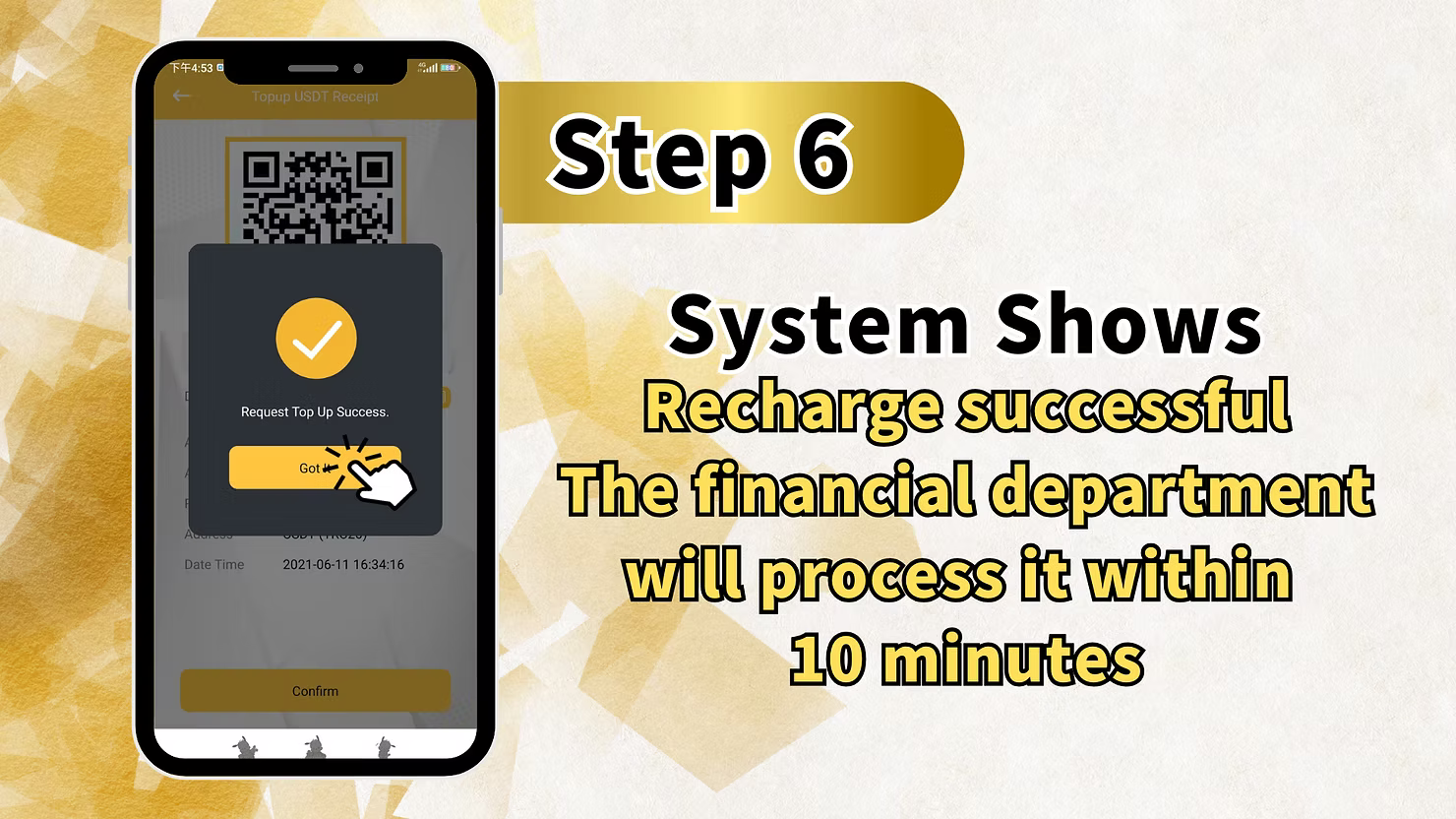
After submission, a confirmation screen will appear, notifying you that your request has been received. You will also see a timestamp for your submission.
Final Processing
Our finance team will now verify the transaction on the blockchain using the TXID you provided. Once confirmed, the equivalent MYR amount will be added to your LUCKYTOWN PLUS account balance. This entire process is typically completed within 10 minutes.
USDT Top Up at a Glance
Quick Reference Checklist
Here's a recap of the steps to top up with USDT at LUCKYTOWN PLUS:
- Tap the profile icon at the bottom-right to enter "ME".
- Select "Deposit / Withdrawal".
- Choose "USDT" and specify your sending platform: Binance, Huobi, or Other Wallet.
- Enter the USDT amount and tap "Next".
- Scan the generated QR code with your crypto wallet and complete the transfer.
- Copy the TXID from your wallet and paste it into the LUCKYTOWN PLUS app.
- Review and confirm the details.
- Wait for processing, as funds are usually credited within 10 minutes.
Key Details for Your USDT Transaction
Blockchain Network: TRC20
For all USDT deposits, LUCKYTOWN PLUS exclusively uses the TRC20 network on the Tron blockchain. This selection guarantees high transaction speeds and cost-efficiency. Please verify that your wallet is configured to send USDT via the TRC20 network before initiating a transfer.
Dynamic Exchange Rate
The conversion rate from USDT to MYR is fetched in real time. You will see the exact rate applied to your deposit before final confirmation, ensuring you are fully informed of the transaction's value.
The Importance of Your TXID
Your Transaction Hash is your proof of transfer. It is the only way for our system to locate and verify your deposit on the blockchain. Always ensure you copy and paste the complete, correct TXID.
Important Guidelines for a Smooth Deposit
Network Selection is Crucial
Before sending, confirm that your wallet is set to send USDT on the TRC20 network. Sending via other networks like ERC20 or BEP20 will result in the irreversible loss of your funds.
Match the Sending Platform Accurately
Choose the correct option for where you are sending your USDT from. This simple step helps our system route your transaction correctly and speeds up the verification process.
Safeguard Your TXID
Keep a record of your TXID until you see the funds credited to your LUCKYTOWN PLUS account. It is your most important piece of information in case any follow-up is needed.
Standard Processing Time
While blockchain confirmations can take a few moments, our internal verification and crediting process is designed to be completed within 10 minutes of receiving your TXID.
Frequently Asked Questions About USDT Top Up
What exactly is USDT?
USDT, or Tether, is a type of cryptocurrency known as a stablecoin, designed to maintain a 1:1 value with the US Dollar. LUCKYTOWN PLUS accepts it as a deposit method and converts it to MYR, providing a stable and efficient way to fund your account.
Which network must I use to send USDT?
LUCKYTOWN PLUS requires all USDT deposits to be sent via the TRC20 network on the Tron blockchain. This is the only accepted standard to ensure successful and timely processing.
From which platforms can I send my USDT?
You can send USDT from any reputable exchange or personal wallet that supports the TRC20 network. Common platforms include Binance, Huobi, and software wallets like Trust Wallet or MetaMask. Just be sure to select the corresponding option in the deposit form.
How is the USDT to MYR conversion calculated?
The exchange rate displayed during your deposit is a live rate sourced from current market data. LUCKYTOWN PLUS is committed to providing a fair and transparent conversion for all crypto deposits.
What is a TXID and why must I provide it?
A TXID, or Transaction ID, is a unique alphanumeric code that identifies your specific transaction on the blockchain. It is definitive proof of your transfer, allowing our finance team to quickly verify and credit your account.
How much time does the entire deposit take?
From the moment you paste your TXID and submit the request, the verification and crediting process is typically completed within 10 minutes. This does not include the time it takes for the initial blockchain transfer to be confirmed.
What if I make a mistake with the TXID?
Entering an incorrect TXID will prevent our system from locating your transaction. If this happens, please immediately contact LUCKYTOWN PLUS customer support with the correct TXID and a screenshot of your transfer for assistance.
Is there a minimum amount I must deposit?
Yes, there is a minimum deposit requirement, which is displayed in the app when you enter the amount. Please check the deposit page for the most current minimum.
Can I send USDT from a private wallet not listed?
Absolutely. Simply select the "Other Wallet" option when choosing your deposit method. This is designed for any wallet that supports USDT on TRC20, such as Trust Wallet, MetaMask, or a hardware wallet.
What should I do if my funds don't arrive after 10 minutes?
If you have submitted your TXID and more than 10 minutes have passed without your account being credited, please reach out to LUCKYTOWN PLUS online customer support. Have your TXID and transaction details ready to help them assist you quickly.
Get Started with Crypto Deposits Today
Embrace the speed and security of cryptocurrency. Follow our simple guide to make your first USDT deposit at LUCKYTOWN PLUS. Enjoy fast processing and get straight to your favorite games.
Top Up with USDT at LUCKYTOWN PLUS