
Forgot Transfer Password at LUCKYTOWN PLUS - Complete Guide
Why Your Transfer Password Matters at LUCKYTOWN PLUS


Secure Your Transactions
Your transfer password, also called payment PIN or transaction PIN, is a 6-digit code that secures all financial transactions at LUCKYTOWN PLUS. It's required for withdrawals, transfers, and other sensitive account operations.
Two Ways to Manage
LUCKYTOWN PLUS provides two methods for managing your transfer password: change it when you know your current PIN, or reset it when you've forgotten it using OTP verification.
Method 1: Change Transfer Password (When You Know Your Current PIN)
Step 1: Access Main Menu
Open the LUCKYTOWN PLUS app. On the main page, click the bottom right corner where it says "MENU" to access your account options.
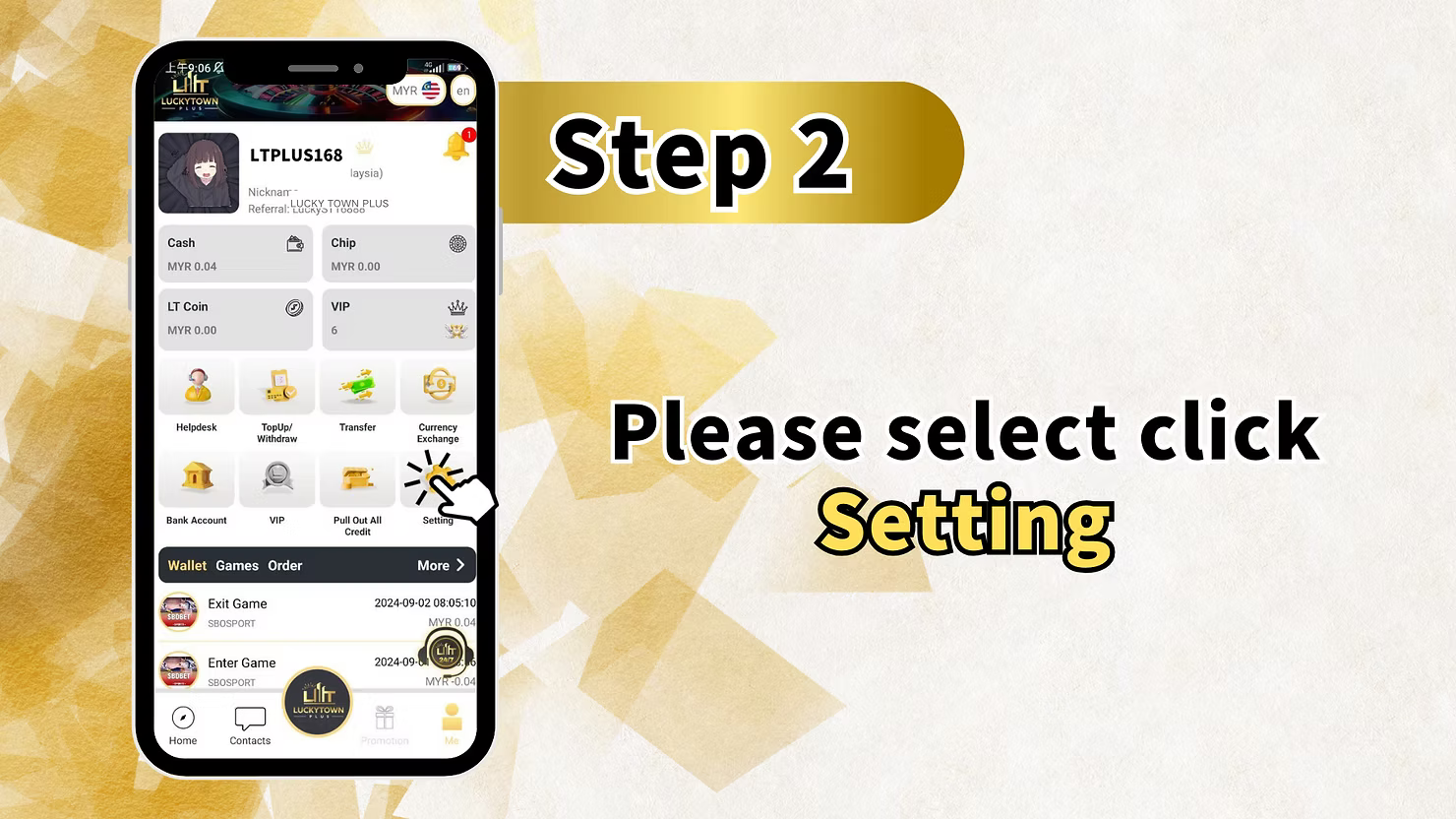
Step 2: Go to Settings
From the menu, select "Setting" to open your account settings.
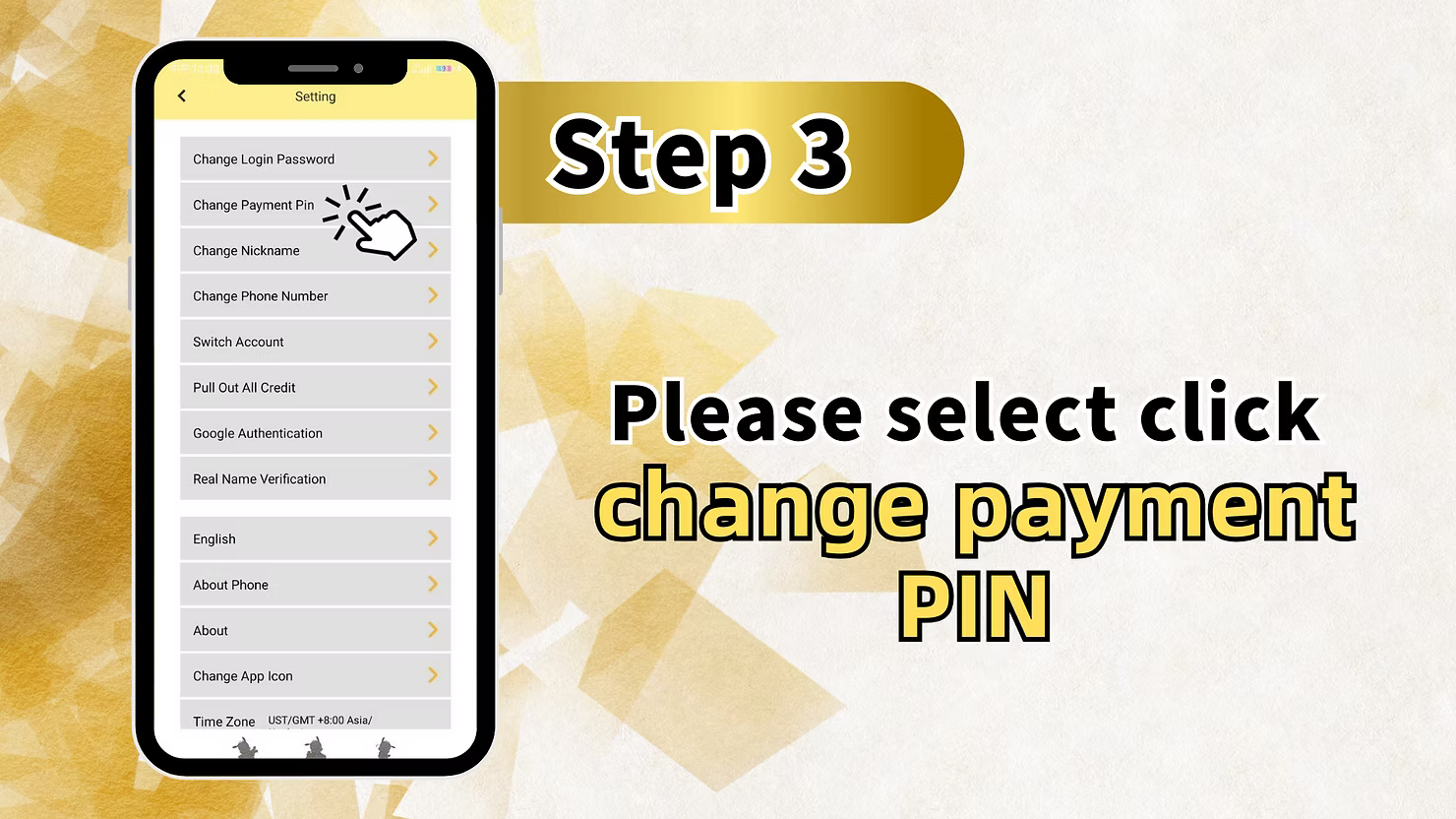
Step 3: Select Change Payment PIN
Look for and click on "Change Payment PIN" or "Change Transaction Password."
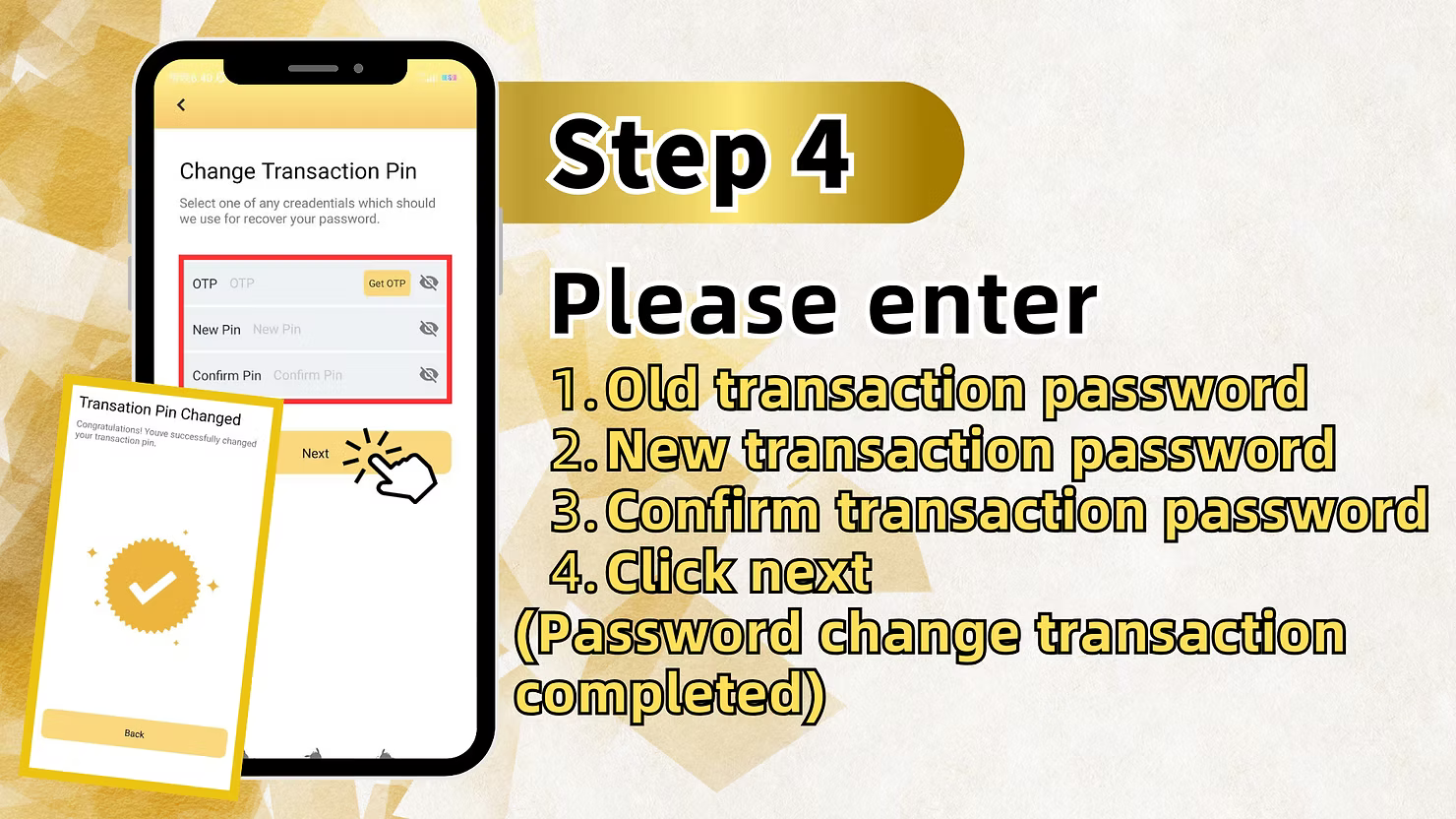
Step 4: Enter Current Transaction Password
Click on the field and enter your current transaction password, which is your existing 6-digit PIN.
Step 5: Enter New Transaction Password
After verifying your current PIN, enter your new transaction password.
Step 6: Confirm New Password
Re-enter your new transaction password to confirm. Click "Next" to save the change.
Step 7: Confirmation
The system will confirm that your transaction password has been changed. Your new PIN is now active.
Method 2: Forgot Transfer Password (Reset When Forgotten)
Step 1: Access Deposit/Withdrawal
If you've forgotten your payment PIN, navigate to "Deposit / Withdrawal" from the main menu.
Step 2: Begin Withdrawal Process
Select "Withdraw" to start a withdrawal. This will prompt the payment PIN entry screen.
Step 3: Agree to Terms
Check the box "I have paid and agree" and click "Next" to proceed to the PIN entry screen.
Step 4: Click "Forgot Payment PIN"
On the PIN entry screen, click "Forgot payment PIN" to begin the reset process.
Step 5: Enter Registered Phone Number
Enter your registered phone number associated with your LUCKYTOWN PLUS account. This is where your OTP will be sent.
Step 6: Request OTP
Click "Get OTP" to receive a one-time password via SMS to your registered mobile number.
Step 7: Enter OTP
Enter the OTP you received in the verification field.
Step 8: Set New Transaction Password
Enter your new transaction password, which must be a 6-digit PIN.
Step 9: Confirm New Password
Re-enter your new transaction password to confirm. Click "Next."
Step 10: Confirmation
The system will display "The transaction pin has been modified." Your new payment PIN is now active.
Quick Reference Summary
Change PIN (When Known)
Menu -> Setting -> Change Payment PIN -> Enter current PIN -> Enter new PIN -> Confirm -> Done
Reset PIN (When Forgotten)
Deposit/Withdrawal -> Withdraw -> Agree -> Forgot PIN -> Enter phone -> Get OTP -> Enter OTP -> Set new PIN -> Confirm -> Done
Important Notes for Transfer Password Security
6-Digit PIN Only
Your transfer password at LUCKYTOWN PLUS is always a 6-digit number. Memorize it and never share it.
OTP Security
OTP codes are time-sensitive and sent only to your registered phone number. Never share OTPs with anyone.
Keep Phone Number Updated
Ensure your registered phone number is current. It's essential for OTP verification and account recovery.
Frequently Asked Questions
What is a transfer password?
A transfer password, or payment PIN, is a 6-digit code required for financial transactions at LUCKYTOWN PLUS, including withdrawals and transfers.
What if I forget my transfer password?
Use the Forgot Payment PIN option during withdrawal. Verify with OTP sent to your registered phone and set a new PIN.
How long is the OTP valid?
OTP codes are typically valid for a few minutes. Request a new one if it expires.
What if I don't receive the OTP?
Verify your phone number, check network reception, or contact LUCKYTOWN PLUS customer support.
Can I change my transfer password without the old one?
Yes. Use the Forgot Payment PIN process. You don't need your old PIN to reset it.
Is the transfer password the same as login password?
No. Your transfer password is a separate 6-digit PIN for financial transactions, while your login password is for account access.
Who do I contact for issues?
Contact LUCKYTOWN PLUS customer support immediately if you encounter any problems with your transfer password.
Reset Your Transfer Password Today at LUCKYTOWN PLUS
Forgot your payment PIN? Follow our step-by-step guide to reset your transfer password at LUCKYTOWN PLUS quickly and securely using OTP verification.
Reset Transfer Password at LUCKYTOWN PLUS