
TNG Transfer Top Up at LUCKYTOWN PLUS - Complete Guide
Why Top Up with TNG Transfer at LUCKYTOWN PLUS?

Fast and Secure Deposits
LUCKYTOWN PLUS offers TNG Transfer as a convenient and secure way to top up your account. With multiple bank options and fast processing times, you can start playing your favorite games in no time. Our finance department processes approved deposits within just 10 minutes.
Multiple Bank Options Available
Choose from Malaysia's most popular banks for your deposit at LUCKYTOWN PLUS: Mybank, Maybank, Public Bank, CIMB Bank, and Hong Leong Bank. Select the bank that works best for you and follow our simple step-by-step guide.
Protected by Fraud Prevention Measures
Your security is our priority. LUCKYTOWN PLUS implements strict fraud prevention measures to ensure your deposits are safe. The name on your bank account must match your verified real name, protecting both you and the platform from unauthorized transactions.
Step-by-Step Guide to TNG Transfer Top Up at LUCKYTOWN PLUS
Step 1: Access Your Account
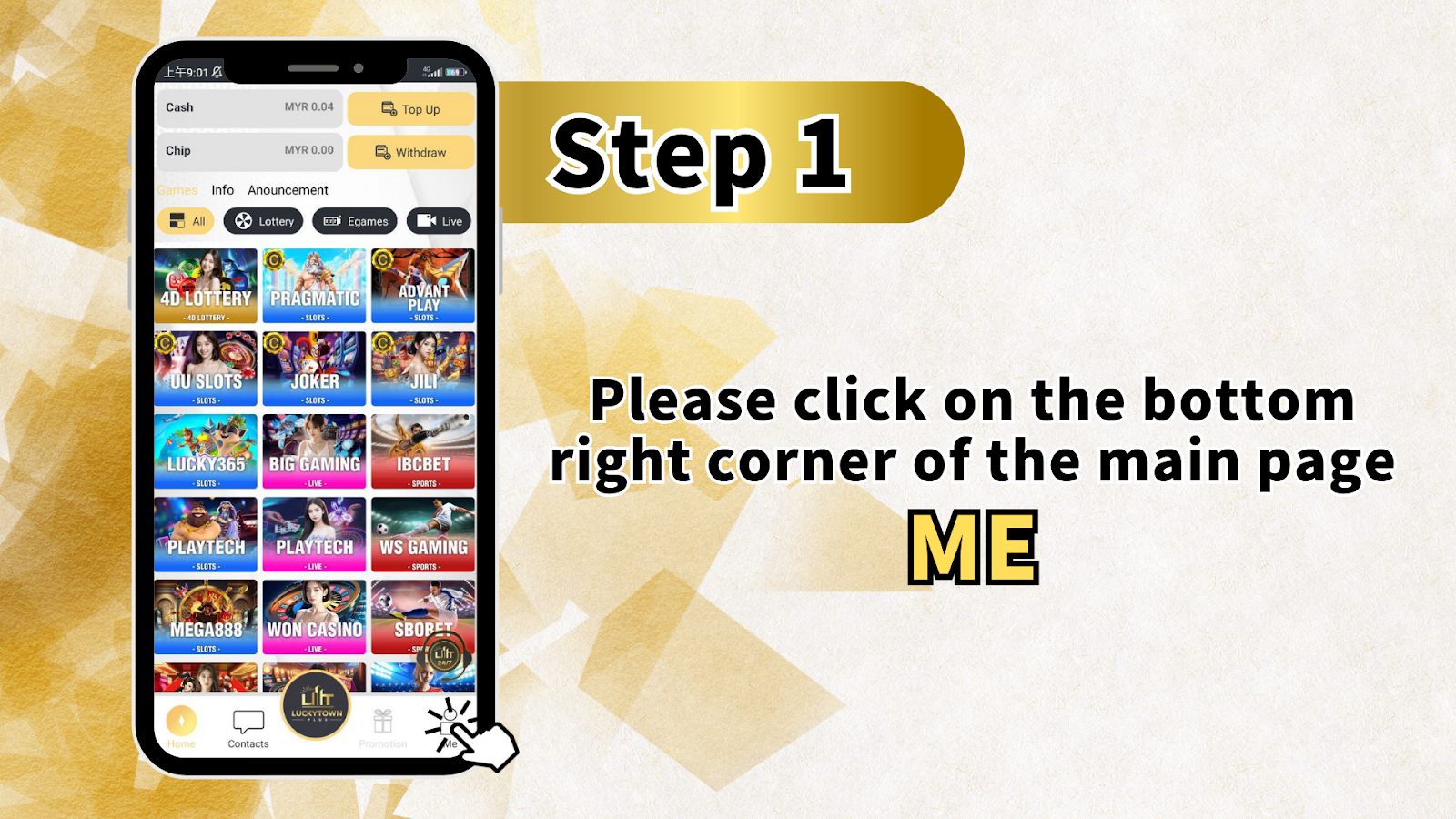
Click on "ME" in the Bottom Right Corner
Open the LUCKYTOWN PLUS app on your mobile device. On the main page, locate the bottom right corner and click on "ME" to access your personal account dashboard.
Step 2: Navigate to Deposit/Withdrawal
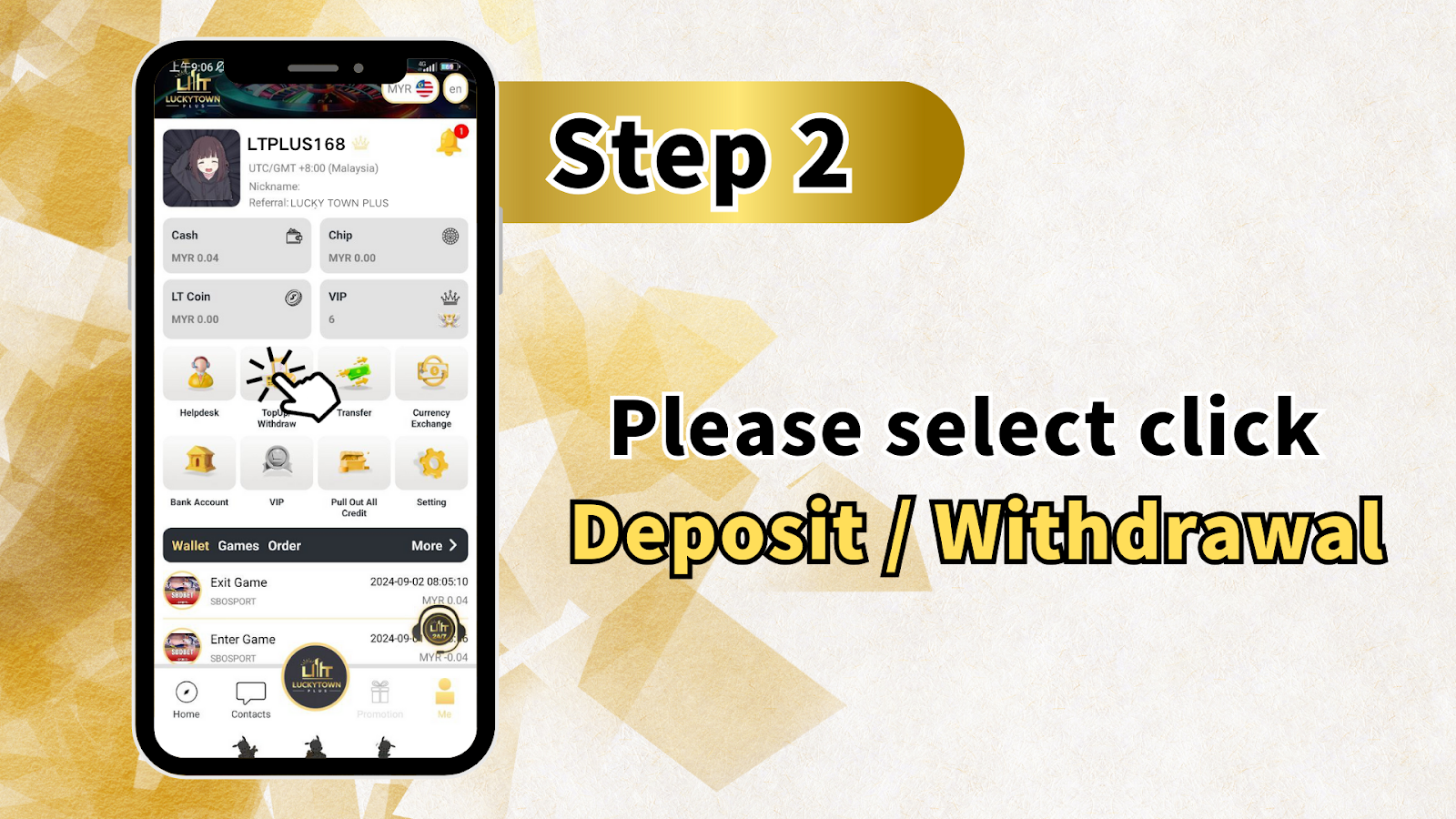
Select "Deposit / Withdrawal"
From the ME menu, click on "Deposit / Withdrawal." This will take you to the funds management page where you can choose between topping up or withdrawing funds from your LUCKYTOWN PLUS account.
Step 3: Choose Top Up Method
Select "Top Up"
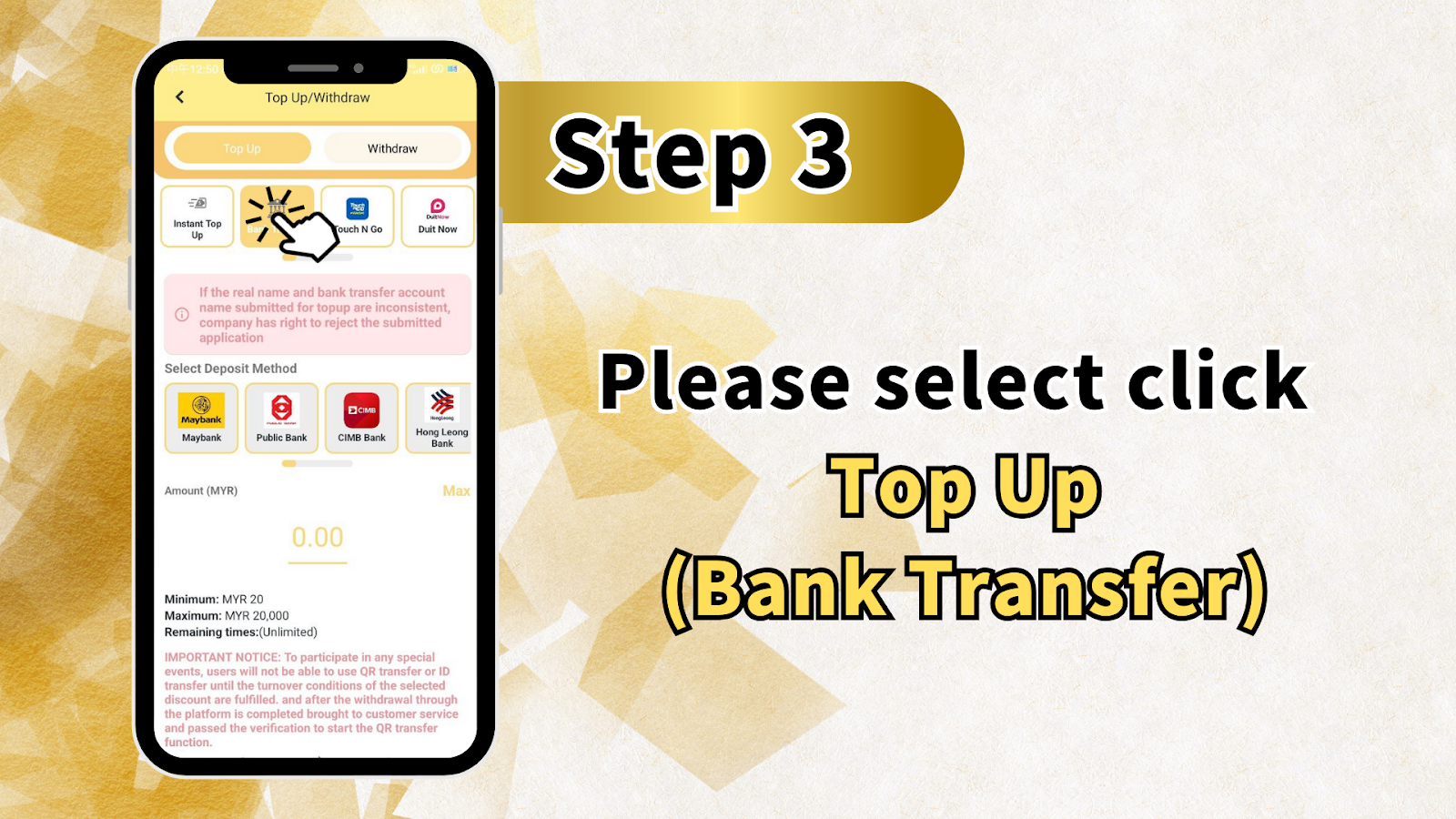
On the Top Up/Withdraw page, you'll see two main options: Top Up and Withdraw. Click on "Top Up" to begin the deposit process.
Important Notice About Account Names
Please note: If the real name and bank transfer account name submitted for payment are inconsistent, the company has the right to reject the submitted application. Ensure your bank account name matches your verified real name at LUCKYTOWN PLUS.
Select Your Deposit Method (Bank)
Choose your preferred bank from the available options:
- Mybank
- Maybank
- Public Bank
- CIMB Bank
- Hong Leong Bank
Enter Deposit Amount
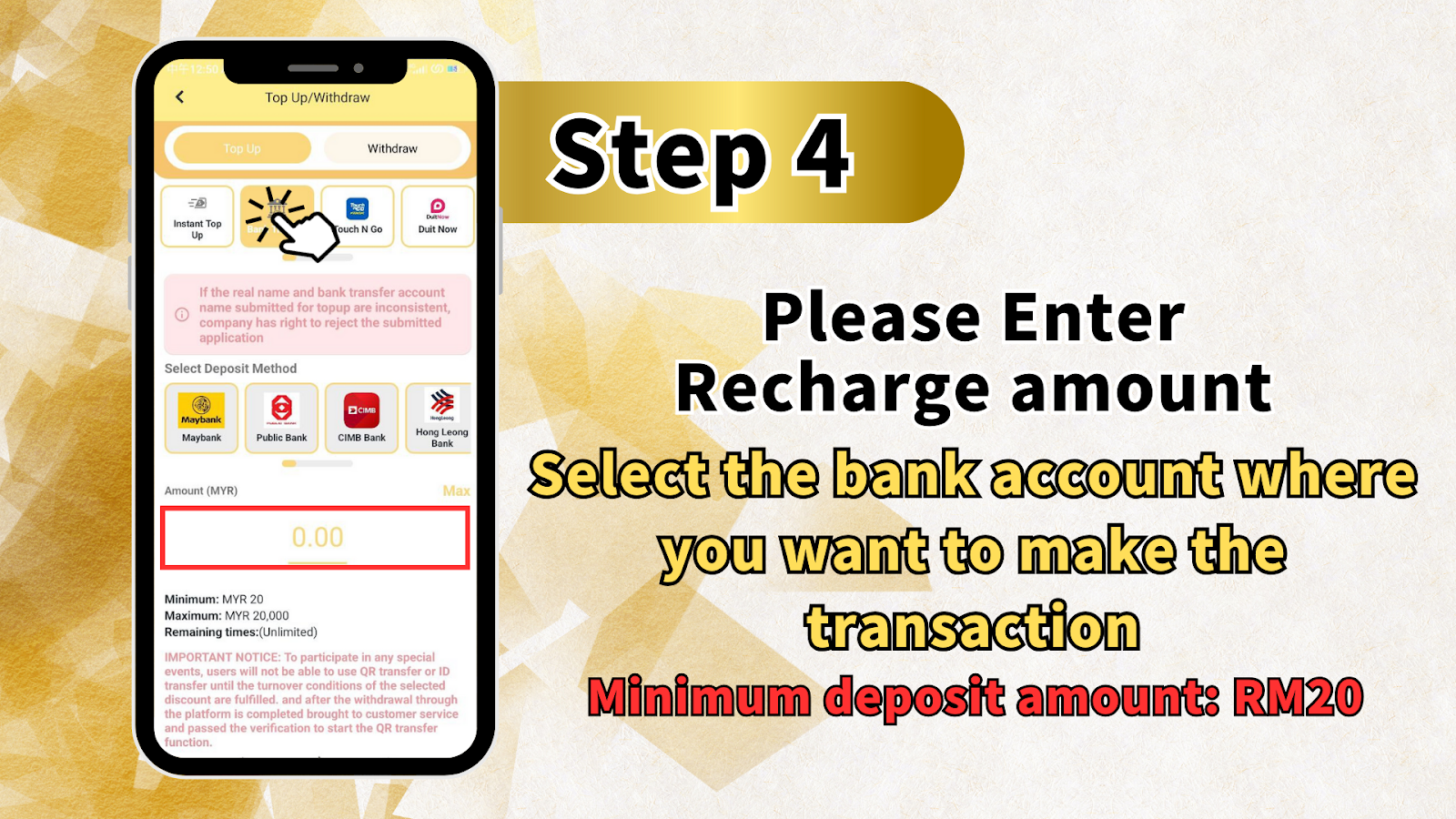
In the Amount (MYR) field, enter how much you wish to deposit. Please note the limits:
- Minimum: MYR 20
- Maximum: MYR 20,000
- Remaining time: Unlimited
After entering the amount, click on "Top Up (Bank Transfer)" to proceed.
Step 4: Review Deposit Details
Confirm Your Deposit Information
Review the recharge amount and the bank account you've selected for the transaction. Remember that the minimum deposit amount is RM20. Double-check all information before proceeding to ensure a smooth transaction.
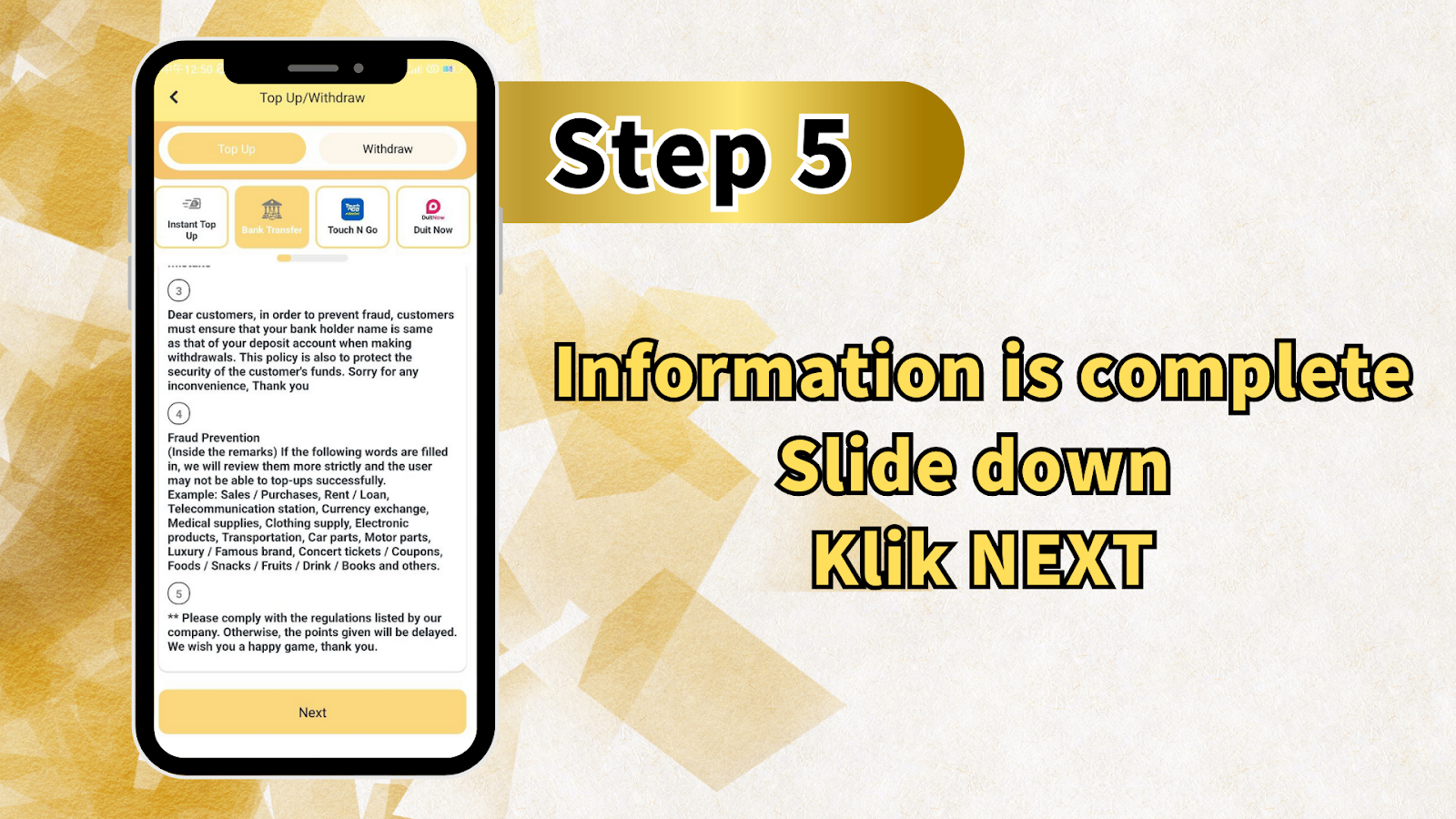
Step 5: Important Fraud Prevention Information
Customer Security Notice
LUCKYTOWN PLUS takes fraud prevention seriously. Please read the following important notices:
Name Matching Requirement: To prevent fraud, customers must ensure that your bank holder name is the same as your deposit account name when making withdrawals. This policy protects the security of your funds.
Restricted Remarks: When making your bank transfer, avoid filling in the following types of remarks, as they will trigger stricter reviews and may result in unsuccessful top-ups: Sales / Purchases, Rent / Loan, Telecommunication station, Currency exchange, Medical supplies, Clothing supply, Electronic products, Transportation, Car parts, Motor parts, Luxury / Famous brand, Concert tickets / Coupons, Foods / Snacks / Fruits / Drink / Books and others.
Compliance Requirement: Please comply with the regulations listed by our company. Otherwise, the crediting of points will be delayed. We wish you a happy gaming experience at LUCKYTOWN PLUS.
Once you've reviewed this information, scroll down and click "NEXT" to proceed.
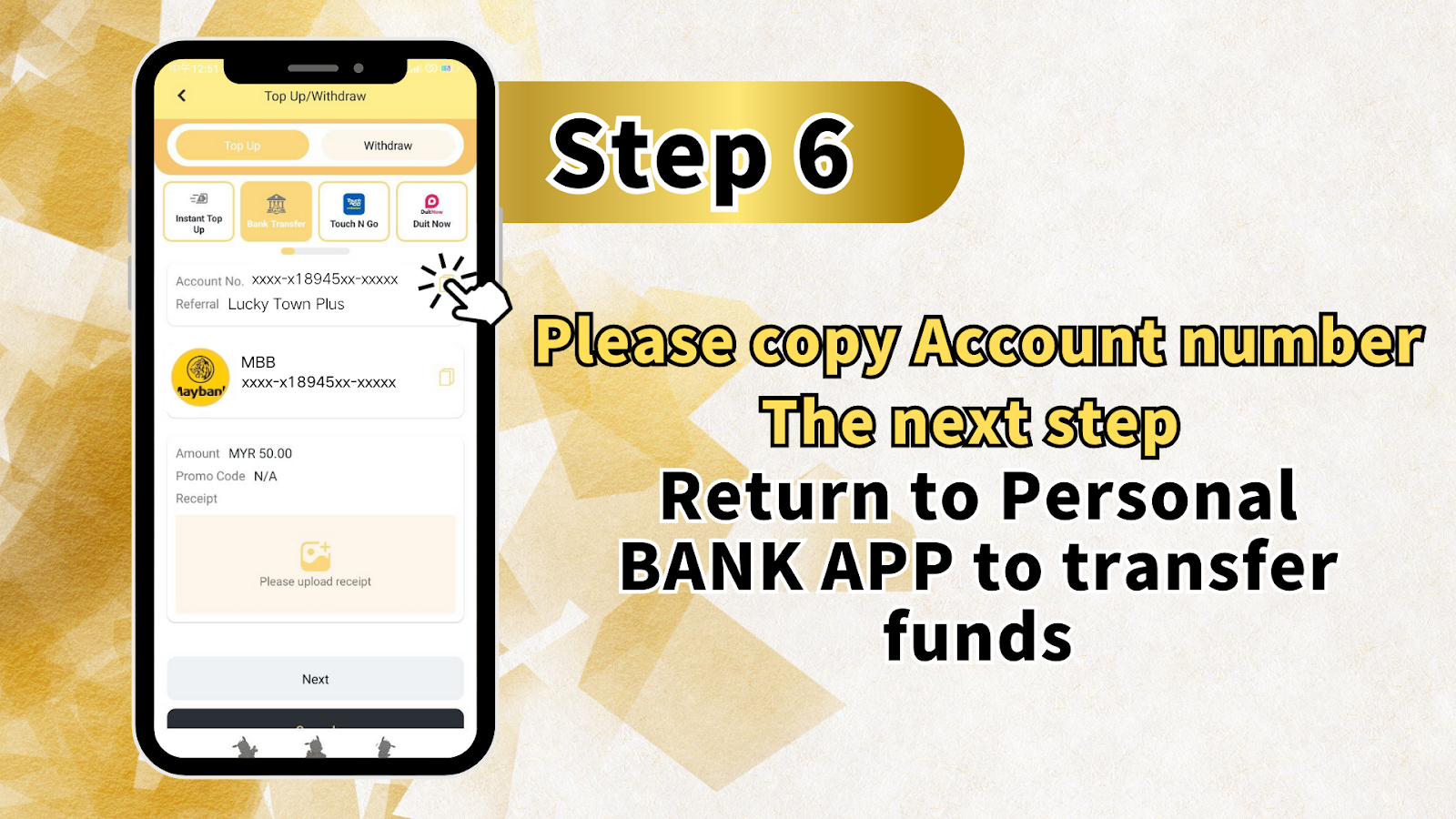
Step 6: Get Bank Account Details
Copy the Provided Bank Account Number
You will now see the bank account details for your deposit. The screen will display:
- Account No.: xxxx-x18945xx-xxxxx (example format)
- Reference: Lucky Town Plus
Please copy the account number shown. You will need this to complete the transfer through your banking app.
Complete Transfer via Bank App
Now, open your BANK APP on your mobile device. Use the copied account number to transfer the exact deposit amount you specified. Complete the transfer as you normally would with your bank.
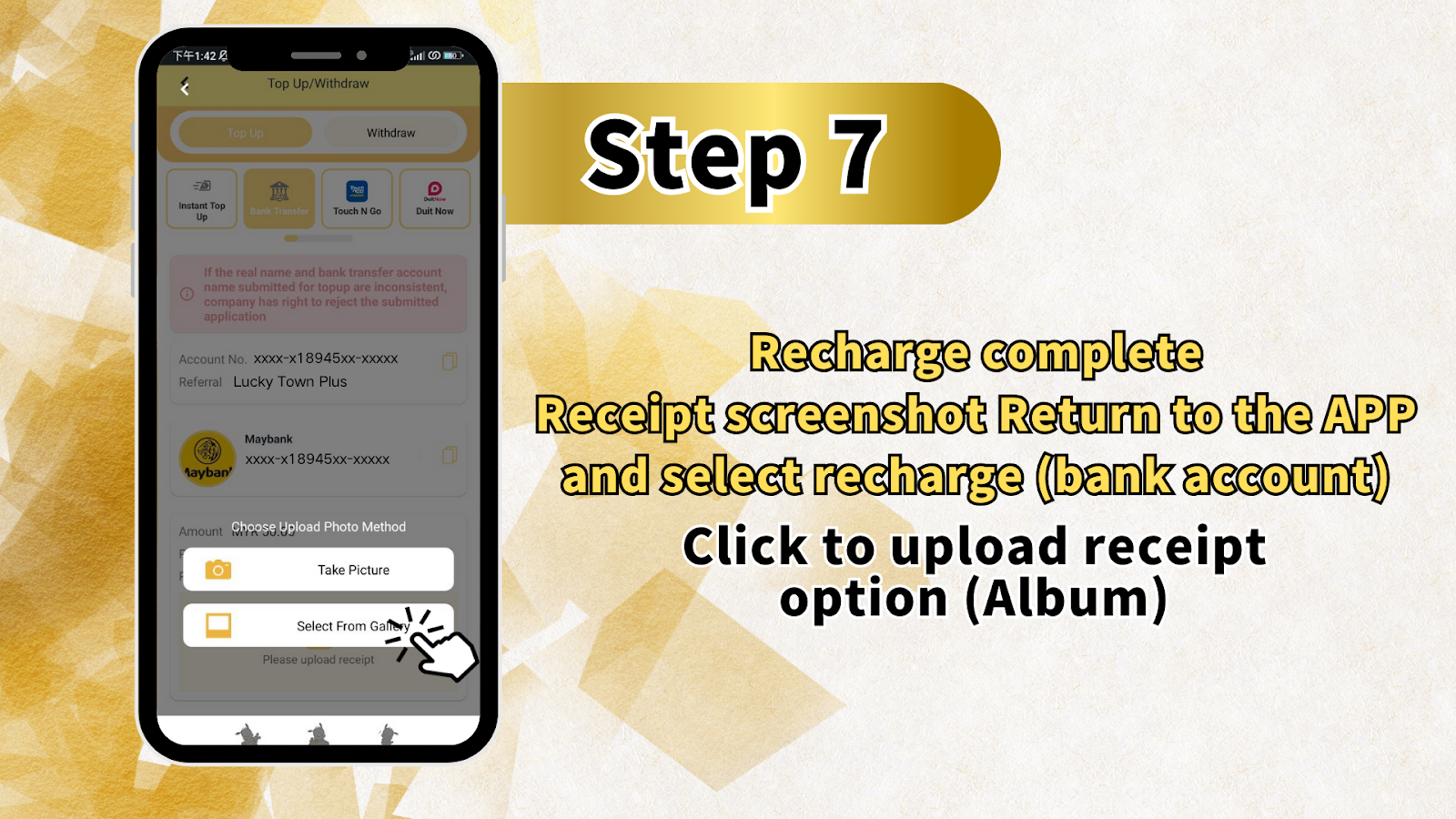
Step 7: Return to LUCKYTOWN PLUS and Upload Receipt
Take a Screenshot of Your Transfer Receipt
After completing the transfer in your bank app, take a screenshot of the receipt or transaction confirmation. This screenshot is essential proof of your payment.
Upload Your Receipt
Return to the LUCKYTOWN PLUS app. You should see an option to upload your receipt. Click to select the receipt upload option, then choose from your Album the screenshot you just took.
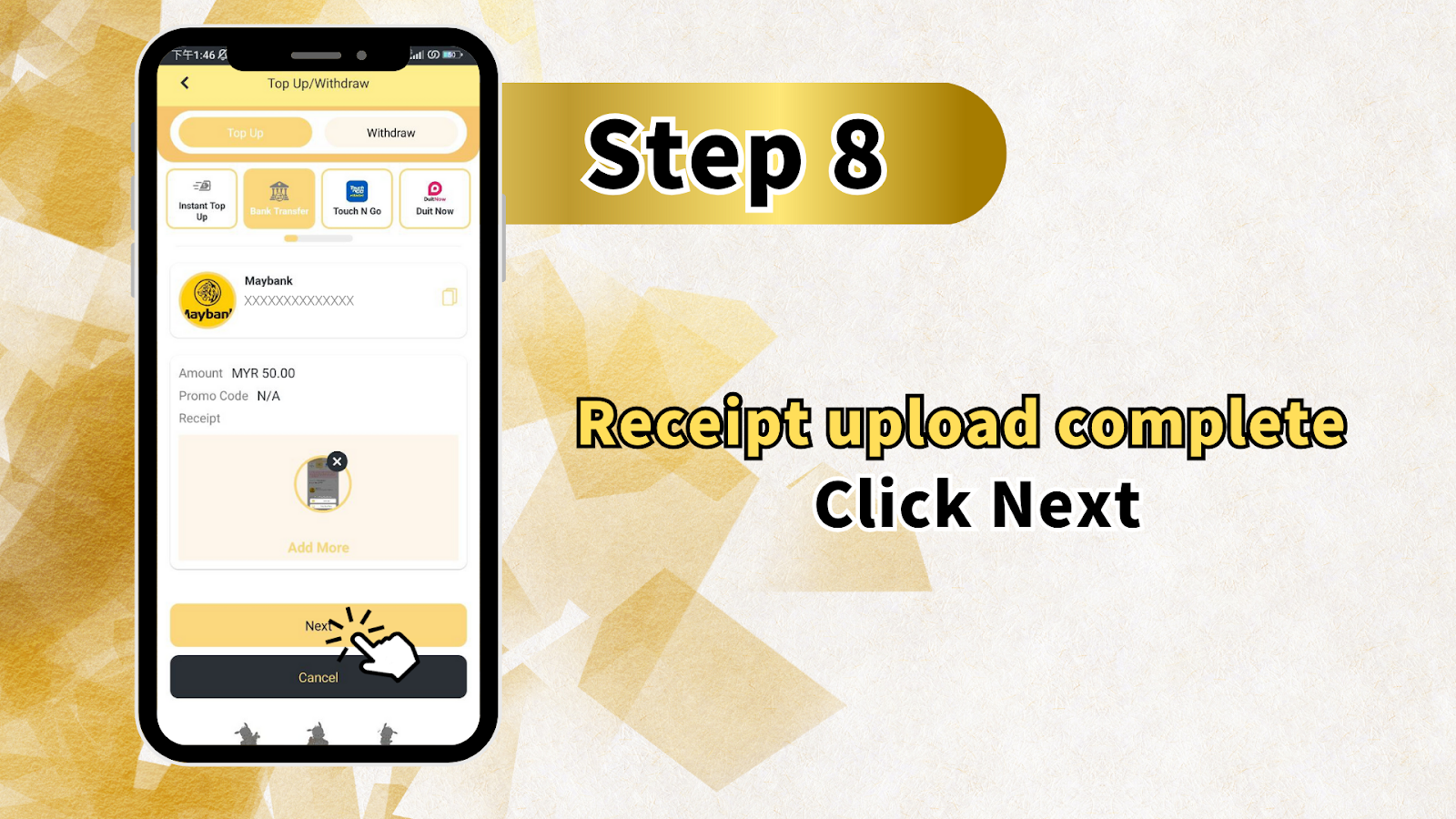
Step 8: Confirm Receipt Upload
Verify Uploaded Information
After uploading your receipt, you'll see a summary of your deposit transaction:
- Paybank: XXXXXXXXXXXXXX
- Withdraw options: Touch N Go, Duit Now
- Maybank: XXXXXXXXXXXXXX
- Amount: MYR 50.00 (example)
- Promo Code: N/A
- Receipt: [Uploaded Image]
You can also select "[Add More]" if you need to upload additional receipts or make multiple deposits.
Once everything looks correct, click "Receipt upload complete Click Next" or simply "Next" to submit your deposit request.
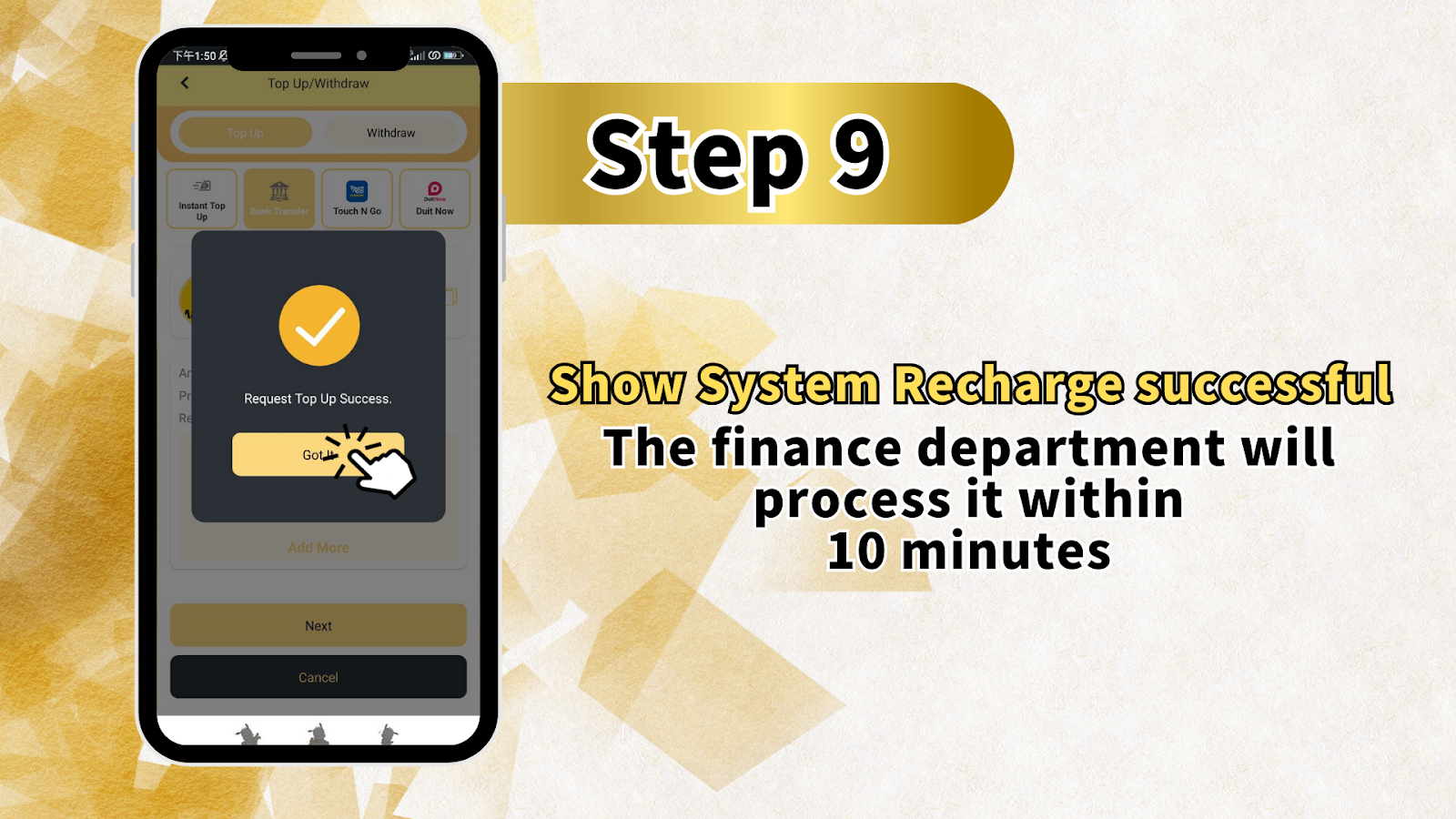
Step 9: Confirmation and Processing
System Shows Recharge Successful
After submitting, the LUCKYTOWN PLUS system will display a confirmation that your recharge request has been successfully submitted.
Processing Time
The finance department at LUCKYTOWN PLUS will process your deposit within 10 minutes. Your account will be credited once the transfer is verified. You can continue using the platform while waiting for processing.
Summary of TNG Transfer Top Up Steps
Quick Reference Checklist
Here's a quick summary of the TNG Transfer top-up process at LUCKYTOWN PLUS:
- Click ME (bottom right corner)
- Select Deposit / Withdrawal
- Choose Top Up and select your bank
- Enter amount (RM20 minimum)
- Review fraud prevention notices
- Copy bank account number
- Transfer via your bank app
- Screenshot receipt and upload to app
- Confirm upload and wait for processing (10 minutes)
Important Notes for Successful Top Up
Name Matching Is Critical
The name on your bank account must exactly match the verified real name on your LUCKYTOWN PLUS account. Any inconsistency may result in rejection of your deposit application.
Avoid Restricted Remarks
When making your bank transfer, do not include any remarks related to commercial transactions (sales, purchases, rent, etc.). Keep the transfer remarks blank or use neutral language to ensure smooth processing.
Keep Your Receipt
Always save your transfer receipt screenshot until your deposit is fully processed and credited to your LUCKYTOWN PLUS account. This is your proof of payment if any issues arise.
Deposit Limits
Remember the deposit limits: minimum RM20 and maximum RM20,000 per transaction. Plan your deposits accordingly.
Frequently Asked Questions About TNG Transfer Top Up
How long does deposit processing take?
The LUCKYTOWN PLUS finance department processes approved deposits within 10 minutes. Processing time may vary slightly during peak periods.
What banks can I use for TNG Transfer?
You can use Mybank, Maybank, Public Bank, CIMB Bank, and Hong Leong Bank for deposits at LUCKYTOWN PLUS.
What is the minimum deposit amount?
The minimum deposit amount is RM20. Deposits below this amount cannot be processed.
What if my bank account name doesn't match my verified name?
Your deposit application will likely be rejected. Ensure your LUCKYTOWN PLUS account is verified with your real name and that your bank account uses the exact same name.
Why was my top-up unsuccessful?
Common reasons include: name mismatch, using restricted remarks in transfer, incorrect amount, or technical issues. Check all requirements and try again, or contact customer support.
What remarks should I avoid in my bank transfer?
Avoid any commercial or suspicious remarks such as sales, purchases, rent, loan, currency exchange, medical supplies, electronics, luxury items, concert tickets, etc. These trigger additional scrutiny.
Do I need to upload a receipt?
Yes, uploading a screenshot of your transfer receipt is required to verify your payment and credit your LUCKYTOWN PLUS account.
Can I make multiple deposits?
Yes, you can make multiple deposits up to the maximum limit per transaction. Use the [Add More] option if needed.
Who do I contact if my deposit isn't credited after 10 minutes?
If your deposit isn't credited after the 10-minute processing window, please contact LUCKYTOWN PLUS customer support through the Helpdesk option for assistance.
Top Up Your Account Today at LUCKYTOWN PLUS
Ready to play? Follow our step-by-step TNG Transfer guide to top up your LUCKYTOWN PLUS account now. Fast processing, multiple bank options, and secure transactions. Deposit as low as RM20 and start enjoying all your favorite games!
Top Up at LUCKYTOWN PLUS