
Recommend Friends at LUCKYTOWN PLUS - Complete Guide
Why Refer Friends to LUCKYTOWN PLUS?

Share the Excitement, Earn Rewards
Recommending friends to LUCKYTOWN PLUS is a simple way to introduce others to the platform while giving yourself the chance to enjoy referral rewards. When your friends register through your sharing tools, you can grow your network and make every invitation more valuable.
Multiple Ways to Share
LUCKYTOWN PLUS gives you several referral methods in one place. You can save your QR code, share it directly, copy your referral link, or use the transfer feature depending on how you want to introduce friends to the platform.
Step-by-Step Guide to Recommend Friends at LUCKYTOWN PLUS

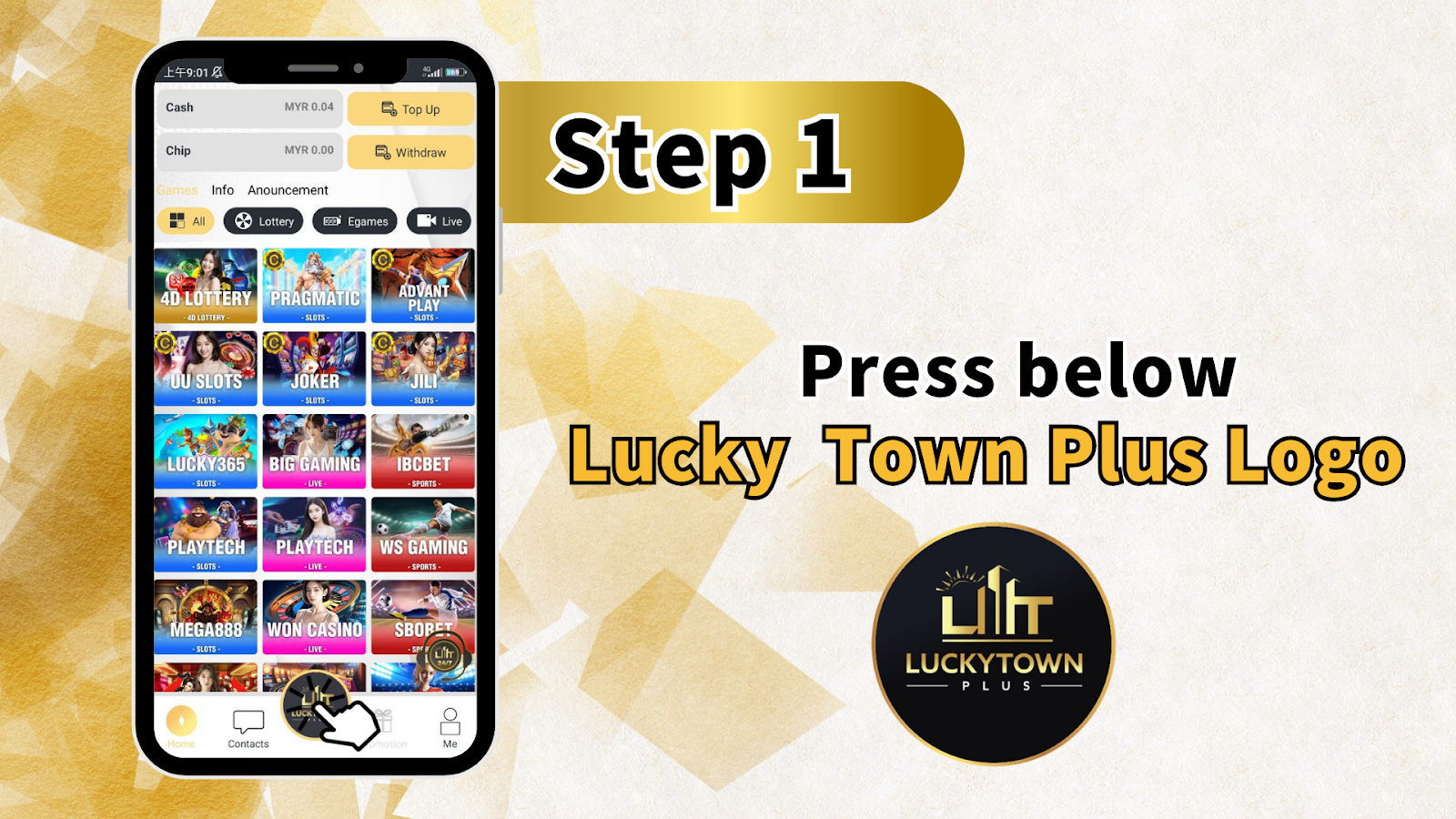
Step 1: Access the Recommend Friends Feature
Locate the Lucky Town Plus Logo
Start by finding the Lucky Town Plus logo inside the interface. This shortcut is your entry point to the referral area, where all sharing tools are grouped together for quick access.
Navigate to Recommend Friends
After tapping the logo, open the Recommend Friends section to view your referral dashboard. This is where you can manage your QR code, link sharing, and transfer-related options from one screen.
Understanding Your Dashboard Before Referring
Left Sidebar Overview
The left side of the page contains quick-access tools that help you understand your current account status before you begin inviting others.
- Cash
- Chip
- Info
- Announcement
Top Bar Information
The top bar displays important balance and action shortcuts so you can move between account tasks while staying inside the same dashboard.
- MYR 0.04
- Top Up
- Withdraw
- Live
Main Content Area - Games Overview
The center of the screen highlights the available game categories, giving your invited friends a quick preview of what they can explore after registration.
- 4D LOTTERY
- PRAGMATIC SLOTS
- ADVANT PLAY SLOTS
- UJ SLOTS
- JOKER SLOTS
- JILI SLOTS
- LUCKY365 SLOTS
- BIG GAMING LIVE
- IBC BET SPORTS
- PLAYTECH SLOTS
- WON CASINO LIVE
- SBOBET LIVE
Bottom Bar Navigation
The bottom navigation gives you fast access to contact support or return to your personal account area when you need more account actions before sharing.
- Contacts
- Me
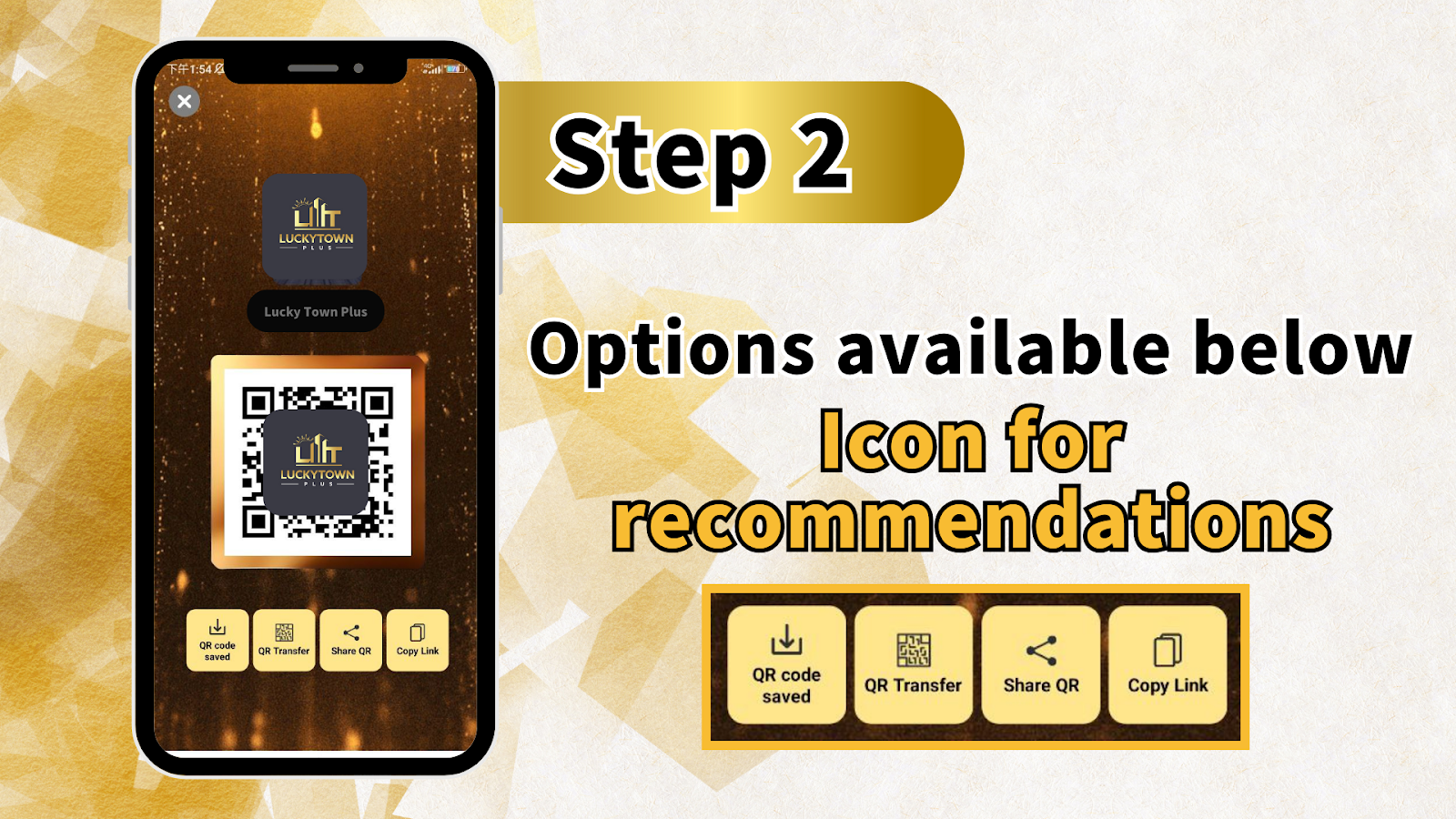
Step 2: Access Your Referral QR Code and Link
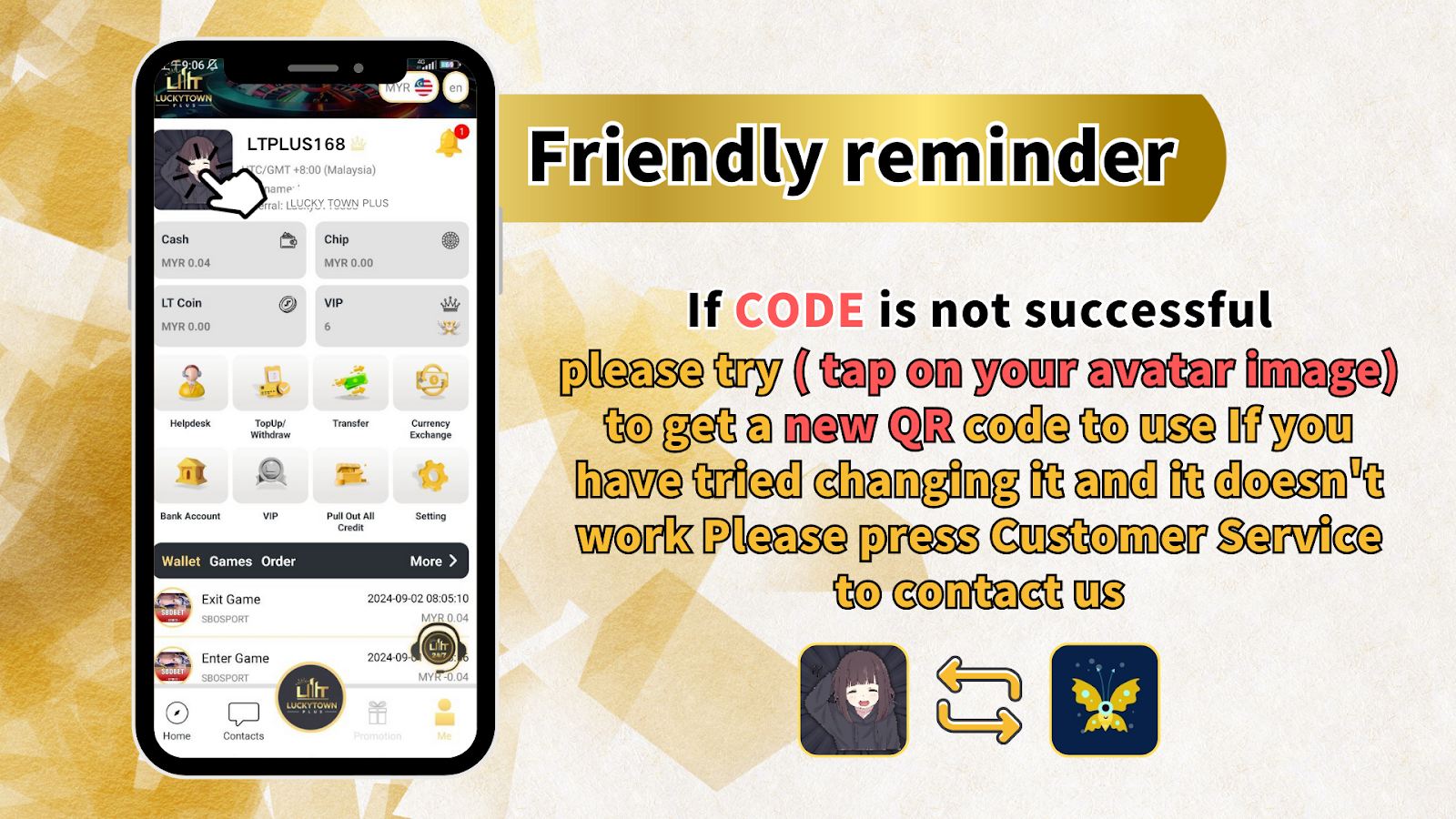
Generate Your Unique Referral Code
Inside the referral area, LUCKYTOWN PLUS provides a personal QR code and link tied to your account. These tools let friends register through your invitation without needing to search for the platform manually.
QR Code Saved Confirmation
Once your QR code is displayed, confirm that it has been saved or is ready to be saved on your device. Keeping a copy on hand makes it easier to share again later without reopening the same screen each time.
Step 3: Choose Your Referral Method
Option 1: Save QR Code
Save the QR code to your device so you can reuse it in chats, social posts, printed materials, or direct sharing whenever needed.
Option 2: Share QR Code
Use the built-in share option to send your QR code through apps such as WhatsApp, Telegram, Messenger, or other communication tools on your device.
Option 3: Copy Link
Copy your referral link and paste it wherever text sharing works better than images. This is useful for messages, captions, and social posts.
Option 4: Transfer
The transfer option supports account-to-account interaction through QR tools, giving you another way to work within the same sharing area while guiding friends through the platform experience.
Step 4: Promote to Your Friends
Share on Social Media
Post your referral link or QR code on the social platforms you already use so more people in your network can see the invitation and join through your account.
Send Direct Messages
For a more personal approach, send the QR code or copied link directly to friends through private chat apps, SMS, or email.
In-Person Sharing
If you meet friends face to face, open your QR code on your phone and let them scan it on the spot. This is one of the fastest ways to guide someone to registration.
Troubleshooting: If Your Code Is Not Successful
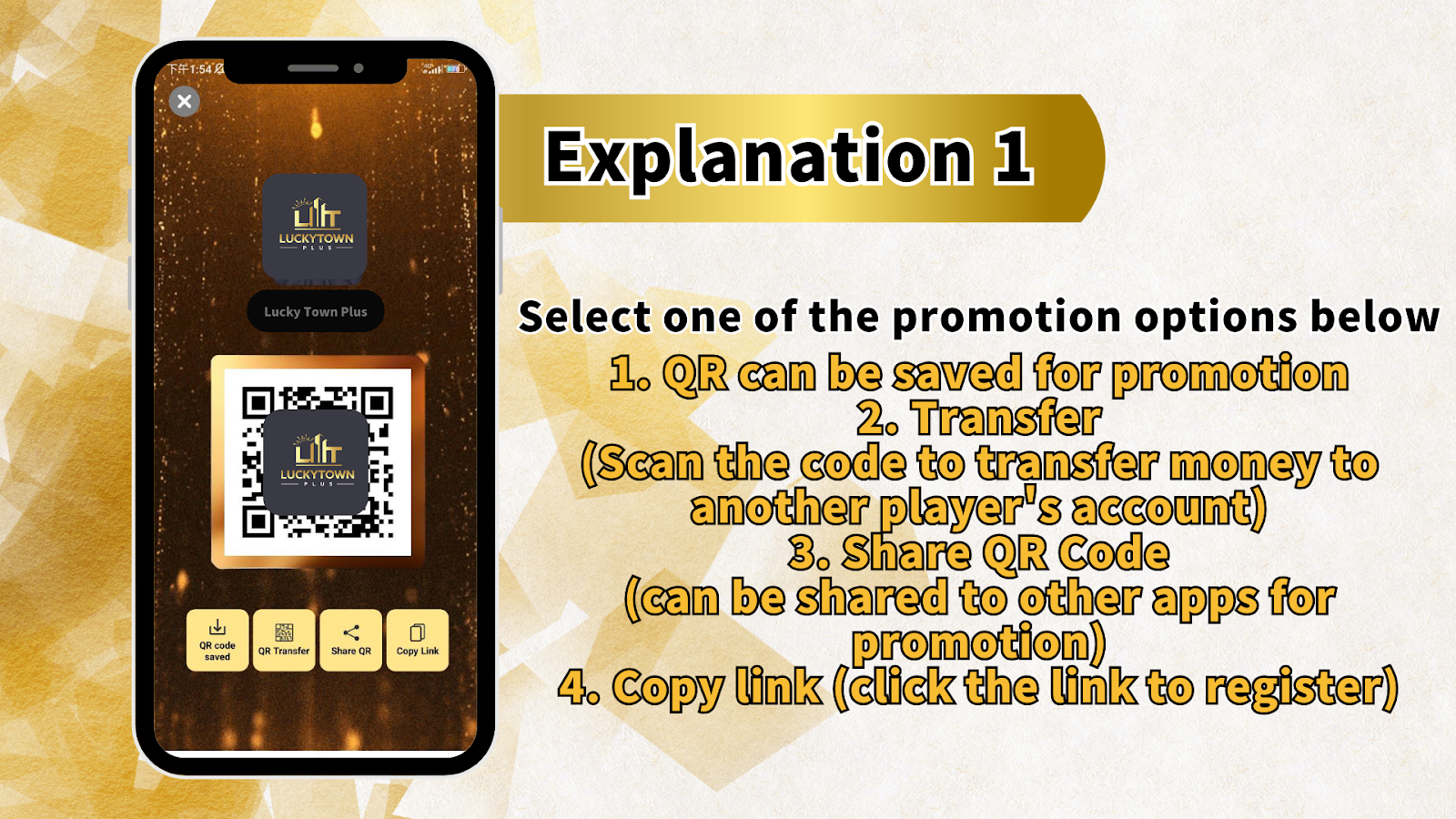
Try Refreshing Your QR Code
If your referral code does not work as expected, go back to your profile or referral area and refresh the QR code. A new code can resolve temporary sharing or recognition issues.
Multiple Attempts
If the first refresh does not solve the problem, try generating or opening the code again and test the latest version before sending it to another person.
Contact Customer Service
If the code still cannot be used after several attempts, contact customer service for direct assistance. The support team can help confirm whether the issue is related to the code, the link, or the receiving device.
Frequently Asked Questions About Referring Friends
How do I know when a friend registers using my code?
You can monitor your referral activity from the relevant account area or confirm with customer service if you need help checking whether a registration was linked to your referral tools.
Can I use both the QR code and the link?
Yes. The QR code and the referral link are both designed to help friends reach the same registration flow, so you can choose whichever format is more convenient.
What if my friend can't scan the QR code?
Use the copied referral link instead. It gives your friend another way to access the registration page without needing to scan an image.
Is there a limit to how many friends I can refer?
The workbook guide does not list a referral limit, so you can continue sharing your code and link whenever you want to invite more people.
What rewards do I get for referring friends?
Referral rewards depend on the current LUCKYTOWN PLUS program structure. Use the in-platform referral area or ask customer service if you want the latest reward details.
Can I refer friends who are already members?
The referral tools are intended for inviting new users. Existing members usually do not need to register again through your code or link.
How do I get a new QR code if mine expires?
Return to your referral or profile area and refresh the code. If a replacement is not generated correctly, customer service can assist you further.
Start Referring Friends Today at LUCKYTOWN PLUS
Now that you know how to recommend friends, use your QR code or referral link to start sharing with people around you. Open the referral area, choose the method that fits your situation, and begin inviting new players today.
Refer Friends at LUCKYTOWN PLUS