
How to Withdraw at LUCKYTOWN PLUS - Complete Guide
Why Withdraw at LUCKYTOWN PLUS Is Secure and Convenient

Protected by Fraud Prevention Measures
LUCKYTOWN PLUS prioritizes the security of your funds. Our withdrawal process includes multiple verification steps and requires that your bank account name matches your verified account name. This protects you from unauthorized withdrawals and ensures your money reaches the right destination.
Fast Processing Within 30 Minutes
Once your withdrawal request is submitted and verified, the LUCKYTOWN PLUS finance department processes it within 30 minutes. You'll receive confirmation and your funds will be on their way to your bank account.
Clear Limits and Transparency
LUCKYTOWN PLUS provides transparent withdrawal limits so you always know what to expect. Minimum and maximum amounts are clearly displayed, along with daily limits and your current balance.
Step-by-Step Guide to Withdraw at LUCKYTOWN PLUS
Step 1: Access Your Account
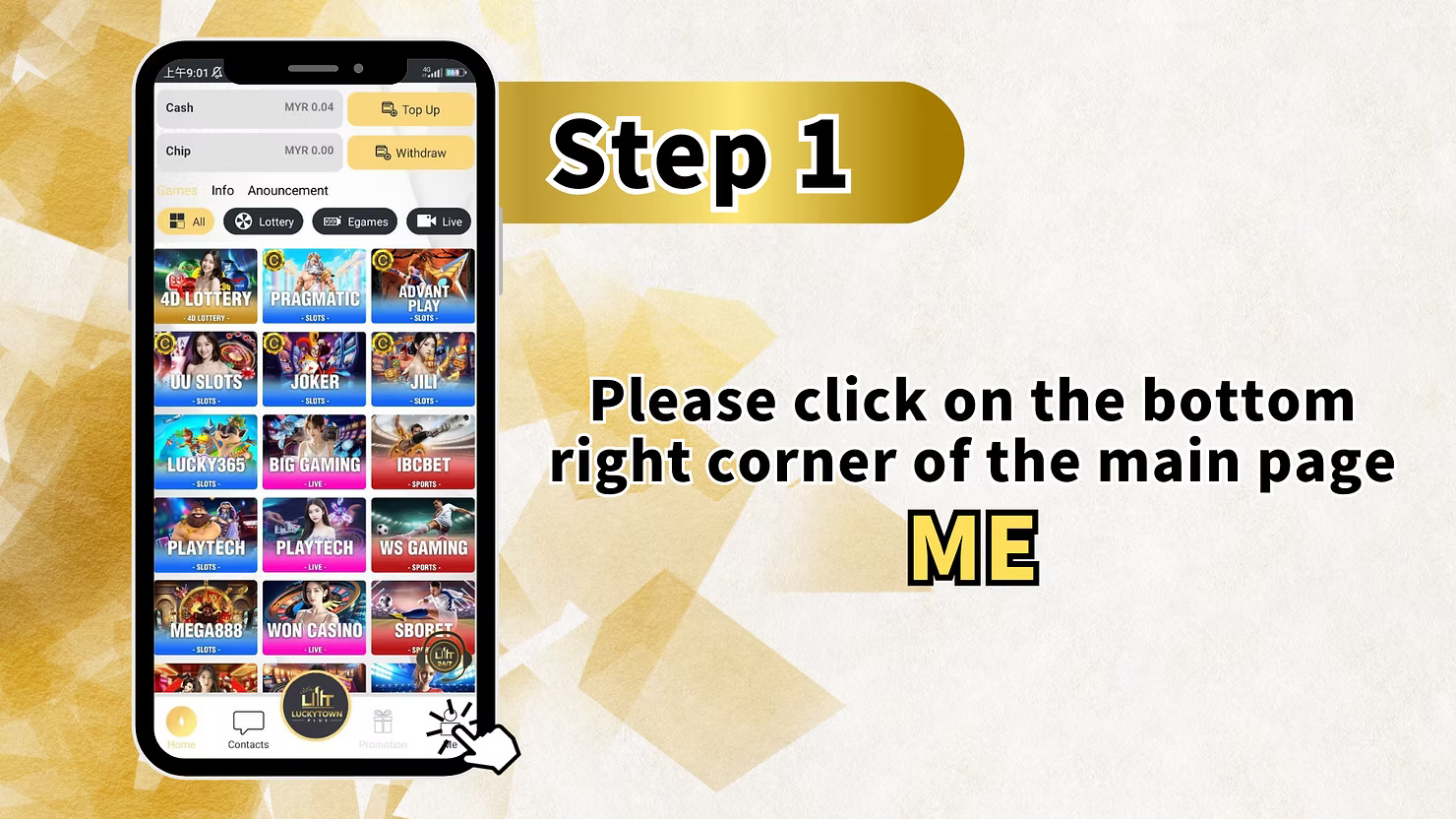
Click on "ME" in the Bottom Right Corner
Open the LUCKYTOWN PLUS app on your mobile device. On the main page, locate the bottom right corner and click on "ME" to access your personal account dashboard. This is your starting point for all account management tasks, including withdrawals.
Step 2: Navigate to Deposit/Withdrawal
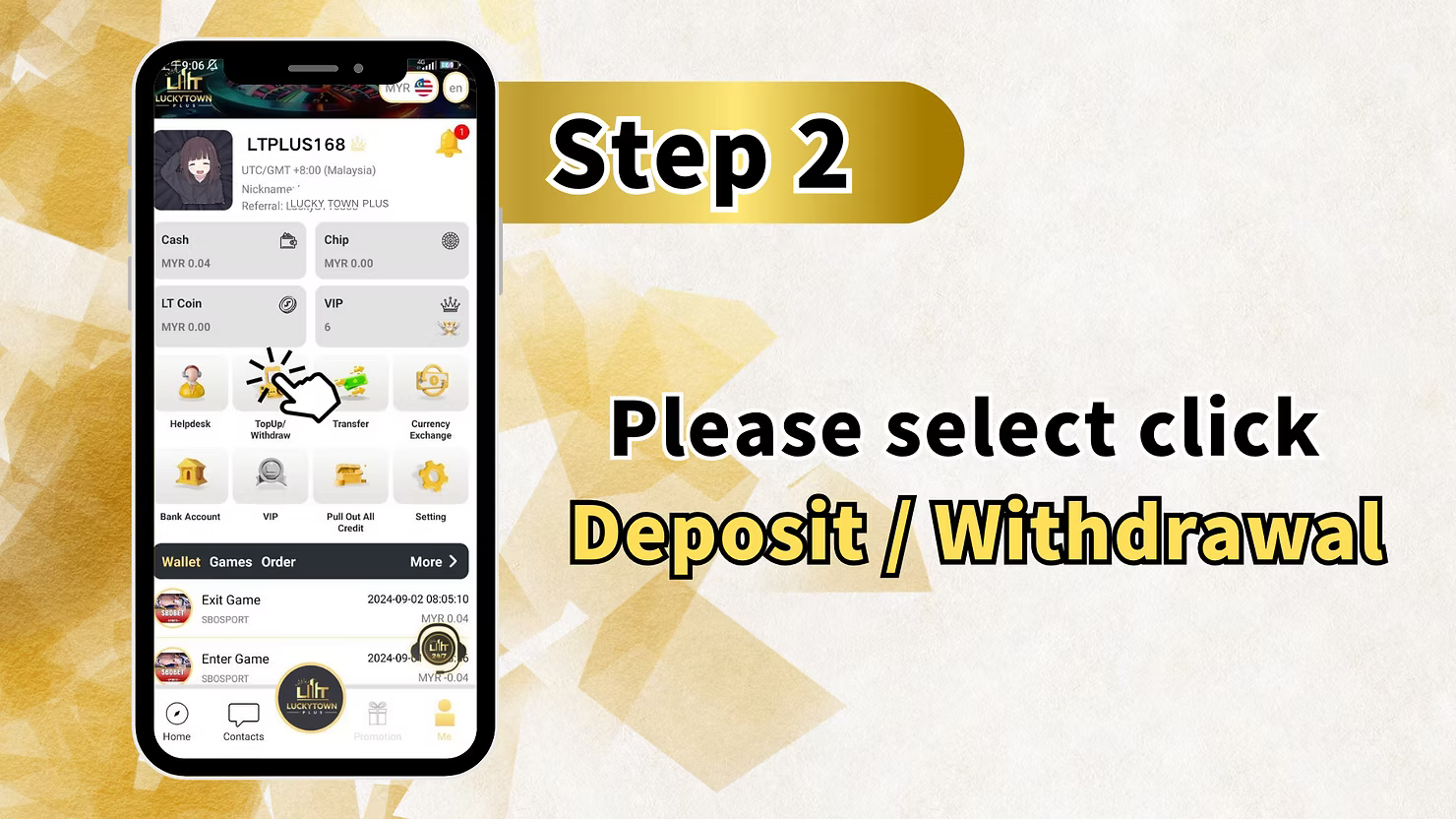
Select "Deposit / Withdrawal"
From the ME menu, click on "Deposit / Withdrawal." This will take you to the funds management page where you can choose between topping up or withdrawing funds from your LUCKYTOWN PLUS account.
Step 3: Select Withdrawal Option
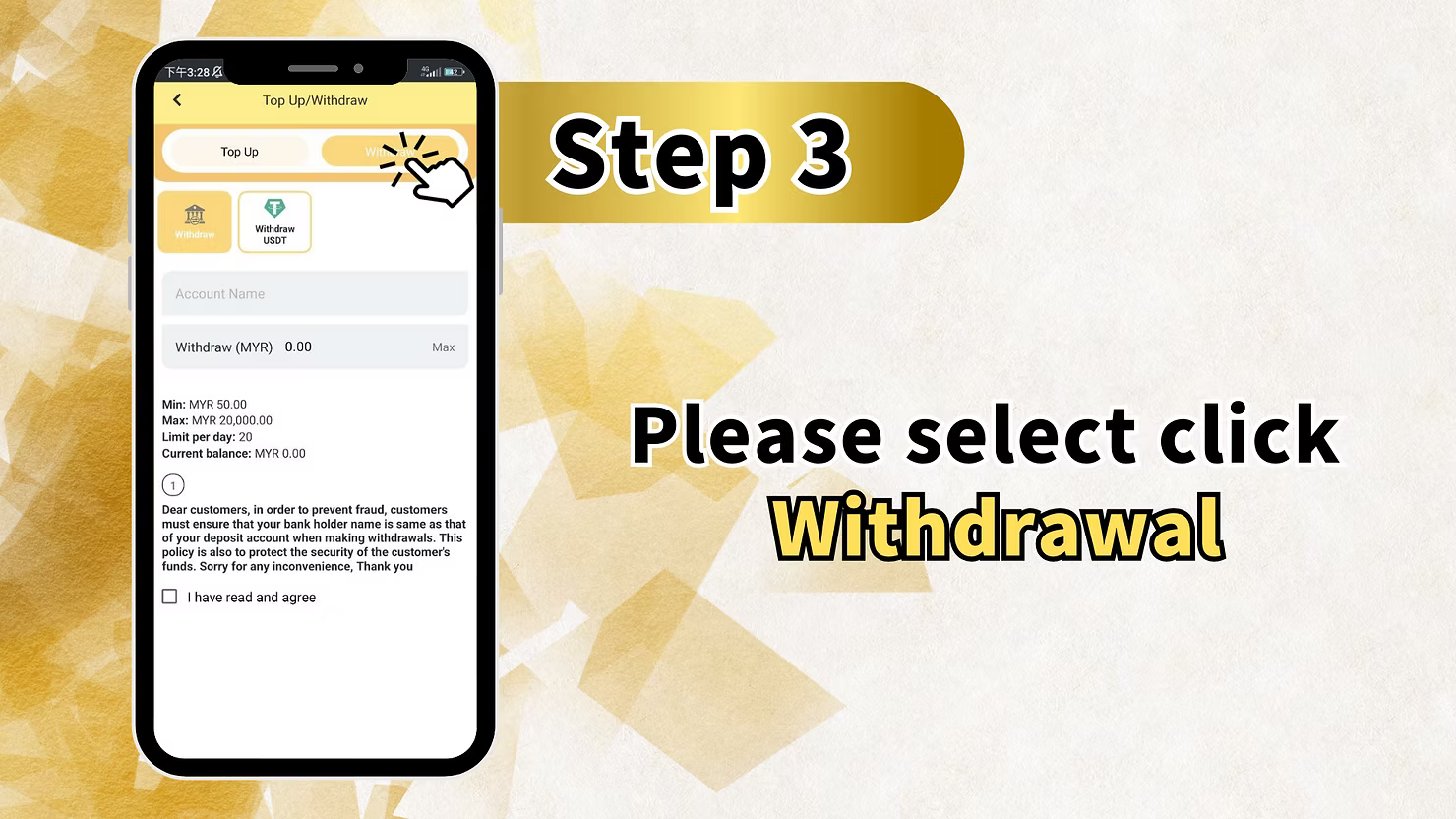
Click on "Withdrawal"
On the Top Up/Withdraw page, you'll see two main tabs or buttons: "Top Up" and "Withdraw." Click on "Withdraw" to begin the withdrawal process.
Review Withdrawal Information
Before proceeding, review the withdrawal information displayed:
- Account Name: Your verified account name
- Withdraw (MYR): Field to enter your withdrawal amount
- Max: Button to quickly select the maximum allowed amount
Withdrawal limits shown on the page include:
- Minimum: MYR 50.00
- Maximum: MYR 20,000.00 per transaction
- Limit per day: 20 withdrawals
- Current balance: Your available balance for withdrawal
Important Fraud Prevention Notice
Please read the following important notice carefully:
"Dear customers, in order to prevent fraud, customers must ensure that your bank holder name is same as that of your deposit account when making withdrawals. This policy is also to protect the security of the customer's funds. Sorry for any inconvenience, Thank you."
Agree to Terms
Check the box "I have read and agree" to confirm that you understand and accept the withdrawal terms and fraud prevention policies.
Step 4: Select Your Bank Account
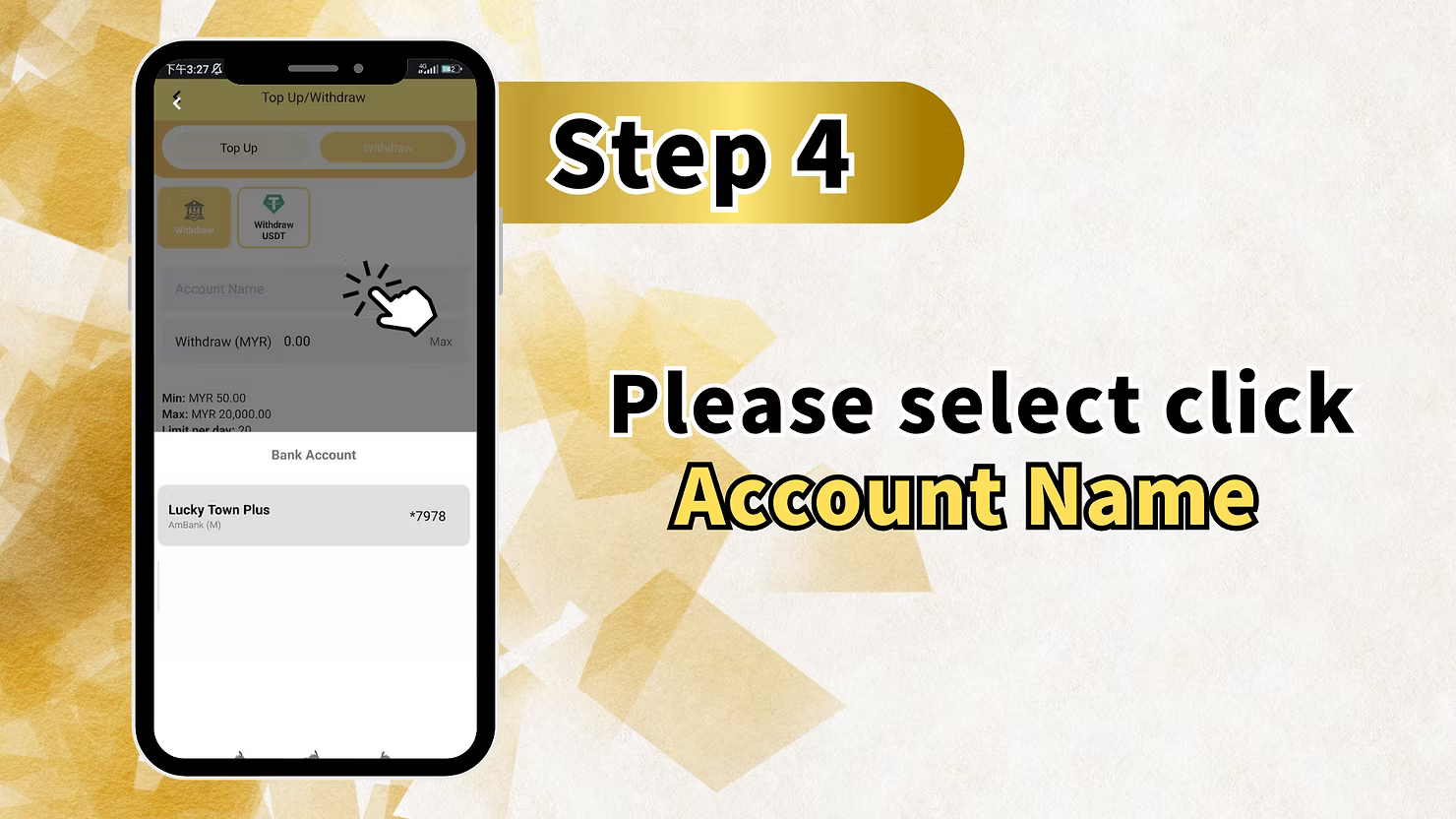
Choose Bank Account for Withdrawal
If you have multiple bank accounts added to your LUCKYTOWN PLUS profile, you'll need to select which one to use for this withdrawal.
The display will show your bank account section, the bank name such as "Lucky Town Plus Ambank (M)", and a masked account number such as "*7978".
Click on your preferred bank account to select it for this withdrawal.
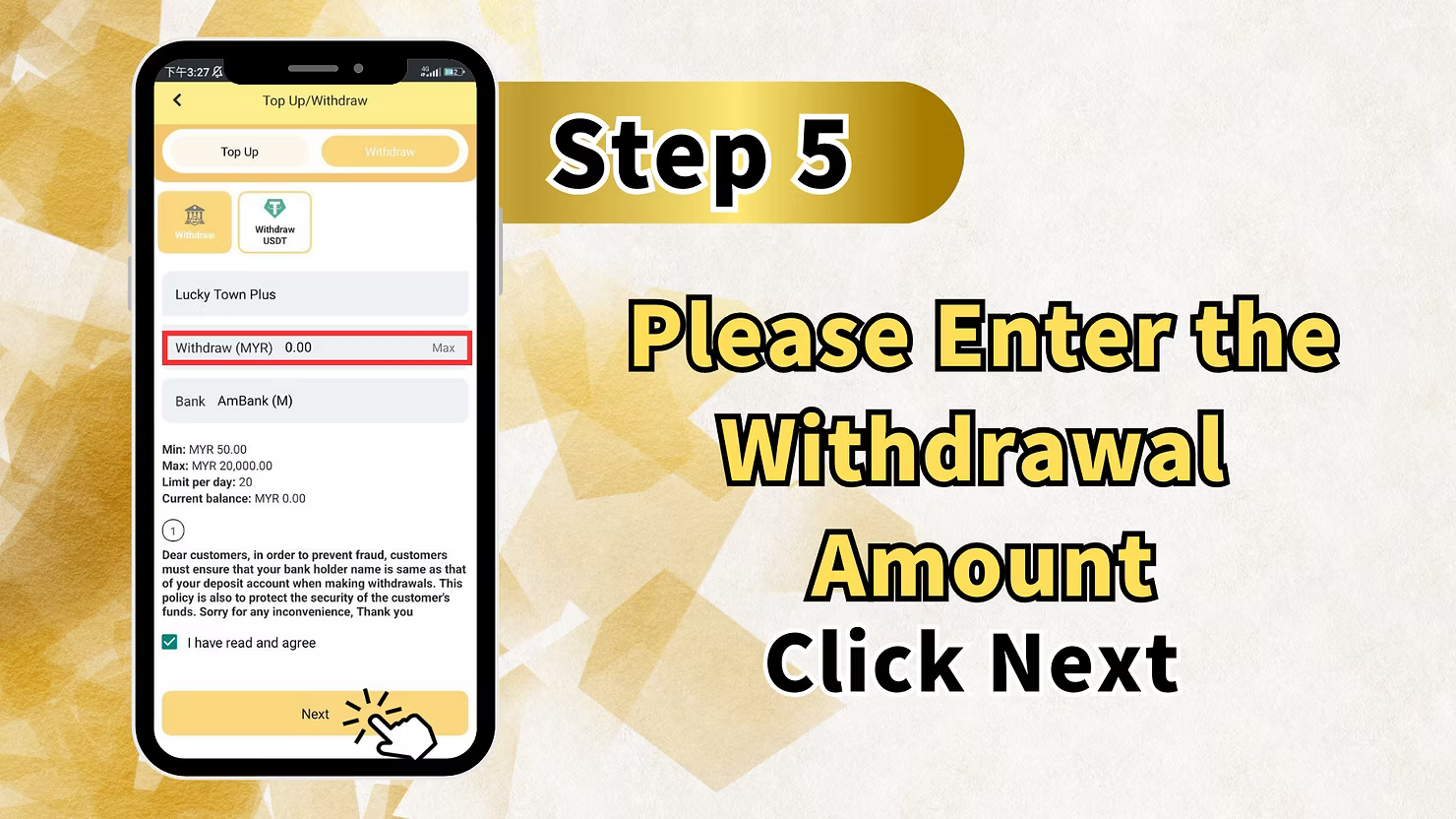
Step 5: Enter Withdrawal Amount
Specify Amount to Withdraw
In the "Withdraw (MYR)" field, enter the amount you wish to withdraw. You can type the amount or click "Max" to withdraw your entire available balance.
Important limits to remember:
- Minimum: MYR 50.00
- Maximum per transaction: MYR 20,000.00
- Additional note shown in the app: "1 limit per draw - 99%"
Verify Bank Details
Double-check that the displayed bank, such as AmBank (M), and account details are correct before proceeding.
Click "Next" to Continue
After entering the amount and verifying all details, click "Next" to proceed to the next step.
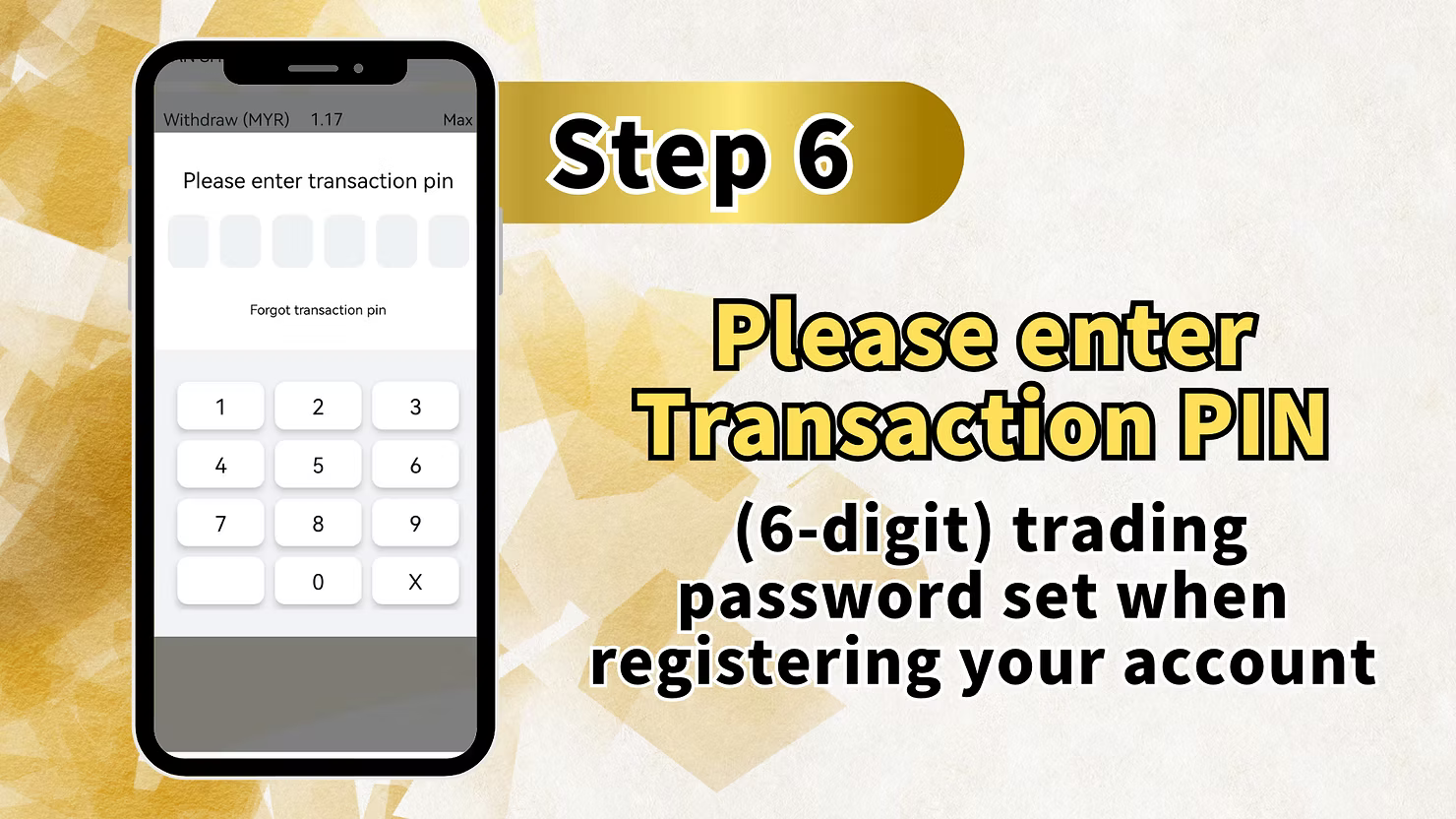
Step 6: Enter Your Transaction PIN
Verify Your Identity
To ensure account security, LUCKYTOWN PLUS requires you to enter your Transaction PIN before processing any withdrawal.
- Enter your 6-digit transaction PIN using the on-screen keypad.
- The PIN is the same one you set when registering your account.
If you've forgotten your transaction PIN, click "Forgot transaction pin" to reset it through the account recovery process.
The PIN entry screen displays your requested amount, such as "Withdraw (MYR) 1.17", as a reference.
Security Note
Your transaction PIN is a critical security feature. Never share it with anyone, and ensure you're in a private location when entering it.
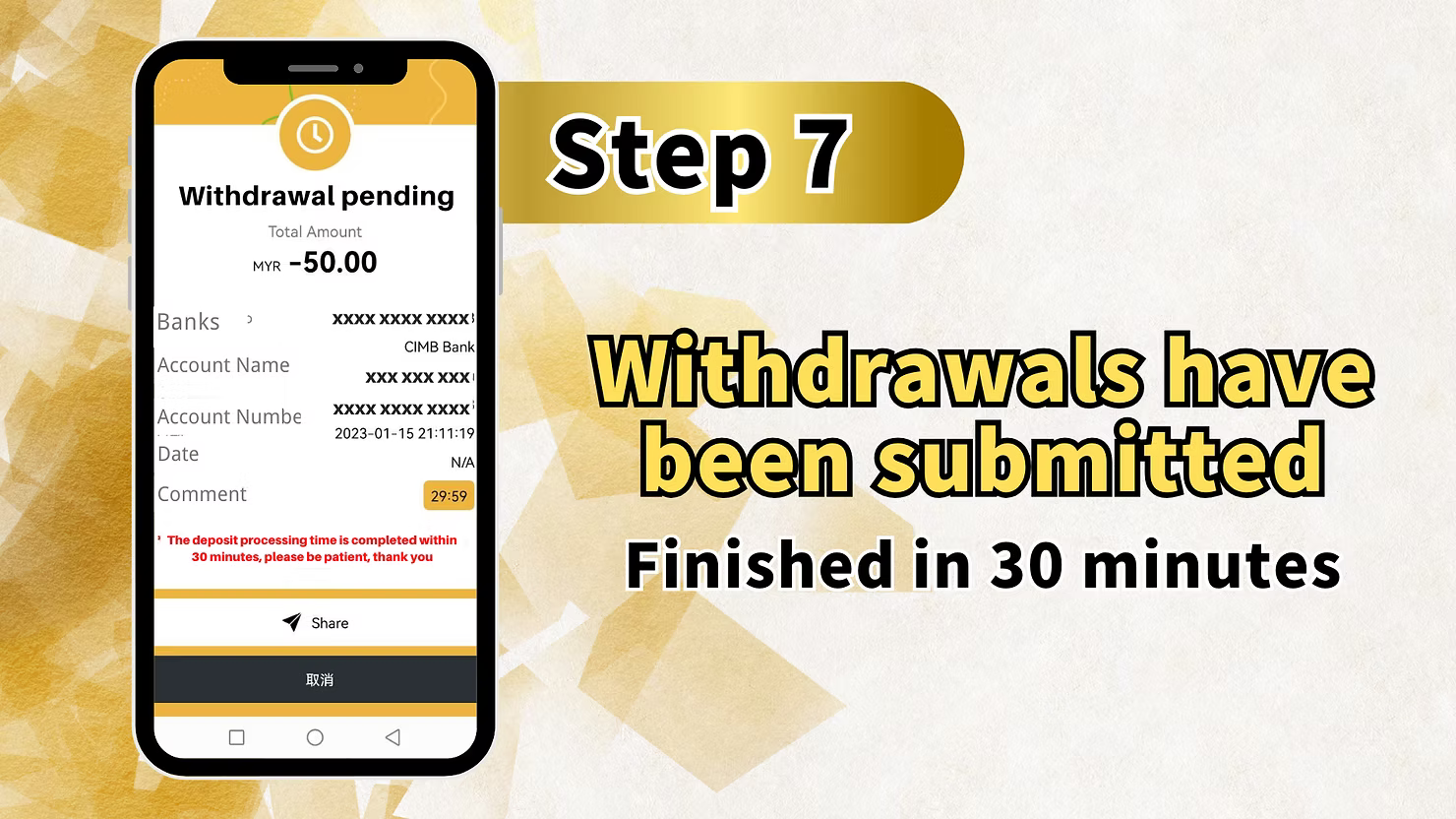
Step 7: Withdrawal Pending Confirmation
Request Submitted Successfully
After entering your PIN correctly, your withdrawal request will be submitted. You'll see a "Withdrawal pending" confirmation screen.
Review Withdrawal Details
The pending screen displays a summary of your withdrawal:
- Total Amount: The amount debited, such as MYR -50.00
- Banks: Masked bank information
- Account Name: Masked for security
- Account Number: Masked for security
- Date: Timestamp of your request
- Comment: Important processing information
Processing Time Information
The comment section includes the message "The deposit processing time is completed within 30 minutes, please be patient, thank you."
You may also see "Withdrawals have been submitted - Finished in 30 minutes."
This means your withdrawal will be processed within 30 minutes of submission.
Summary of Withdrawal Steps
Quick Reference Checklist
Here's a quick summary of the withdrawal process at LUCKYTOWN PLUS:
- Click ME in the bottom right corner.
- Select Deposit / Withdrawal.
- Click the Withdrawal tab.
- Review the limits and fraud prevention notice, then check "I have read and agree".
- Select your bank account.
- Enter your withdrawal amount with a minimum of RM50.
- Click Next.
- Enter your 6-digit Transaction PIN.
- Confirm and view the Withdrawal pending screen.
- Wait for processing, which is completed within 30 minutes.
Important Notes for Successful Withdrawal
Name Must Match
Your bank account name must exactly match your verified name on LUCKYTOWN PLUS. Any discrepancy will result in withdrawal rejection to prevent fraud.
Observe Withdrawal Limits
Remember the minimum withdrawal is RM50 and the maximum per transaction is RM20,000. The daily withdrawal limit is 20 transactions.
Keep Your Transaction PIN Secure
Your 6-digit transaction PIN is essential for withdrawals. Memorize it and never share it. Use "Forgot transaction pin" if needed.
Processing Time
Withdrawals are processed within 30 minutes. If your funds haven't arrived after this time, contact customer support.
Frequently Asked Questions About Withdrawals
What is the minimum withdrawal amount?
The minimum withdrawal amount at LUCKYTOWN PLUS is MYR 50.00. Withdrawals below this amount cannot be processed.
What is the maximum withdrawal amount?
The maximum per transaction is MYR 20,000.00. The daily limit is 20 withdrawals.
How long do withdrawals take?
Withdrawals at LUCKYTOWN PLUS are processed within 30 minutes of submission. You'll see a "Withdrawal pending" screen until processing completes.
Why does my bank account name need to match?
This is a fraud prevention measure. Requiring the bank account name to match your verified LUCKYTOWN PLUS account name ensures funds go to the rightful owner.
What if I forgot my transaction PIN?
Click "Forgot transaction pin" on the PIN entry screen to reset it through the account recovery process.
Can I withdraw to any bank account?
You can only withdraw to bank accounts you have added and verified in your LUCKYTOWN PLUS profile. The account name must match your verified name.
What does "Withdrawal pending" mean?
"Withdrawal pending" means your request has been successfully submitted and is awaiting processing by the finance department. Processing takes up to 30 minutes.
Why was my withdrawal rejected?
Common reasons include name mismatch, insufficient balance, withdrawal below minimum, or exceeding daily limits. Check these factors and try again.
Can I cancel a withdrawal request?
Once submitted and pending, withdrawals typically cannot be canceled. Contact customer support immediately if you need assistance.
Who do I contact if my withdrawal isn't processed after 30 minutes?
If your withdrawal isn't processed within 30 minutes, please contact LUCKYTOWN PLUS online customer service immediately for assistance.
Withdraw Your Funds Today at LUCKYTOWN PLUS
Ready to withdraw your winnings? Follow our step-by-step guide to withdraw funds at LUCKYTOWN PLUS securely and quickly. Minimum RM50, processing within 30 minutes, and protected by fraud prevention measures. Start your withdrawal now!
Withdraw at LUCKYTOWN PLUS