
MEGA888 Game at LUCKYTOWN PLUS - Complete Guide
Why Play MEGA888 at LUCKYTOWN PLUS?

Popular Slot Game Platform
MEGA888 is one of Malaysia's most trusted and popular online slot game platforms. At LUCKYTOWN PLUS, you can access the full MEGA888 collection featuring hundreds of exciting slot titles, fishing games, and classic casino games.
Easy Integration
LUCKYTOWN PLUS offers seamless integration with MEGA888. Download the app once, and you can easily transfer funds and log in using provided account credentials.
Test Accounts Available
MEGA888 at LUCKYTOWN PLUS provides test accounts (test1 to test10000 with password Aa1234) so you can try the games before playing with real funds.
Step-by-Step Guide to Access MEGA888
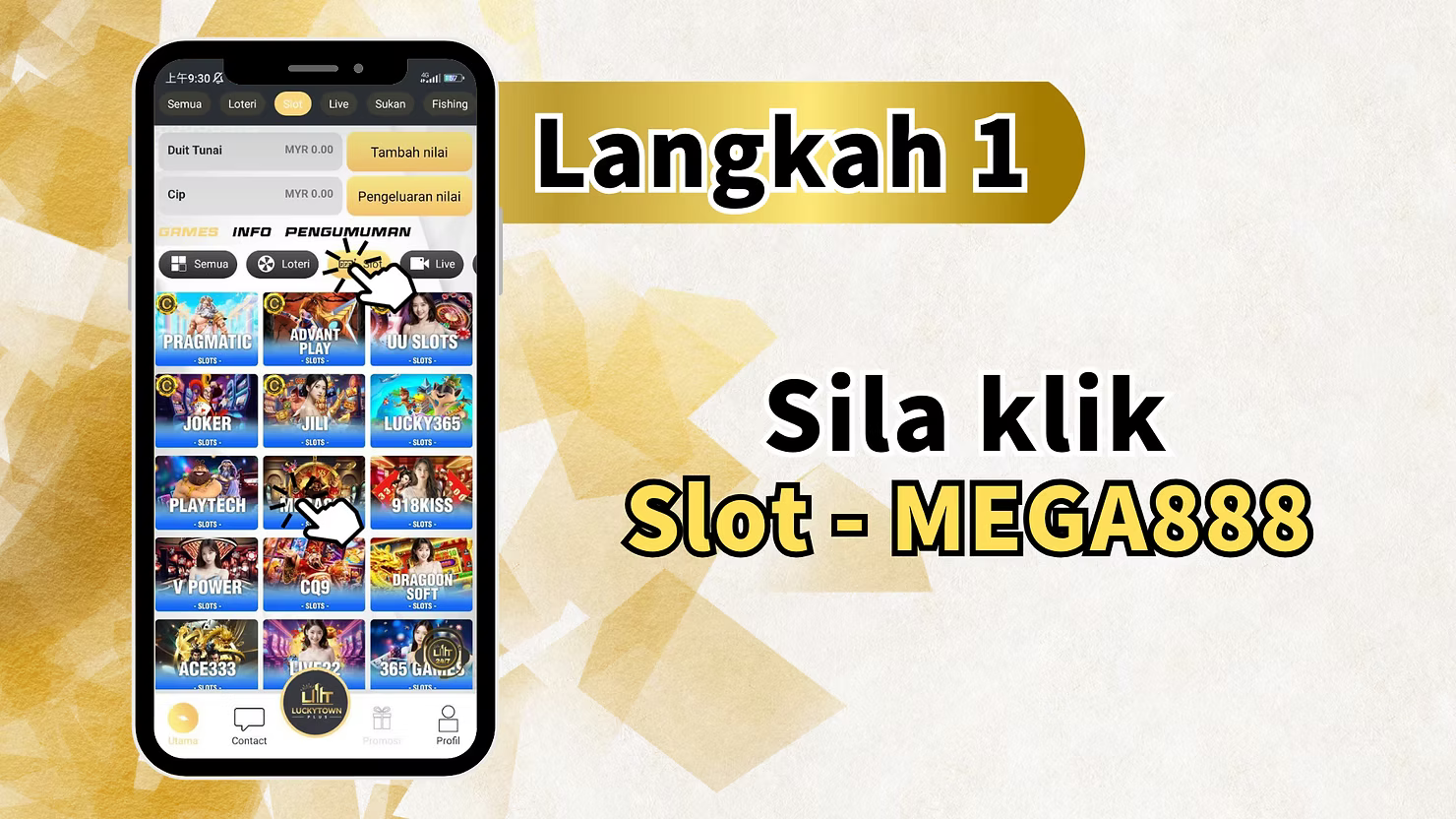
Step 1: Navigate to MEGA888
Log in to your LUCKYTOWN PLUS account. From the main dashboard, navigate to the Slot or Egames section and click on "MEGA888" to access the game page.
The main interface displays various sections including All, Lottery, Live, Sports, Fishing as well as your Cash and Chip balances.
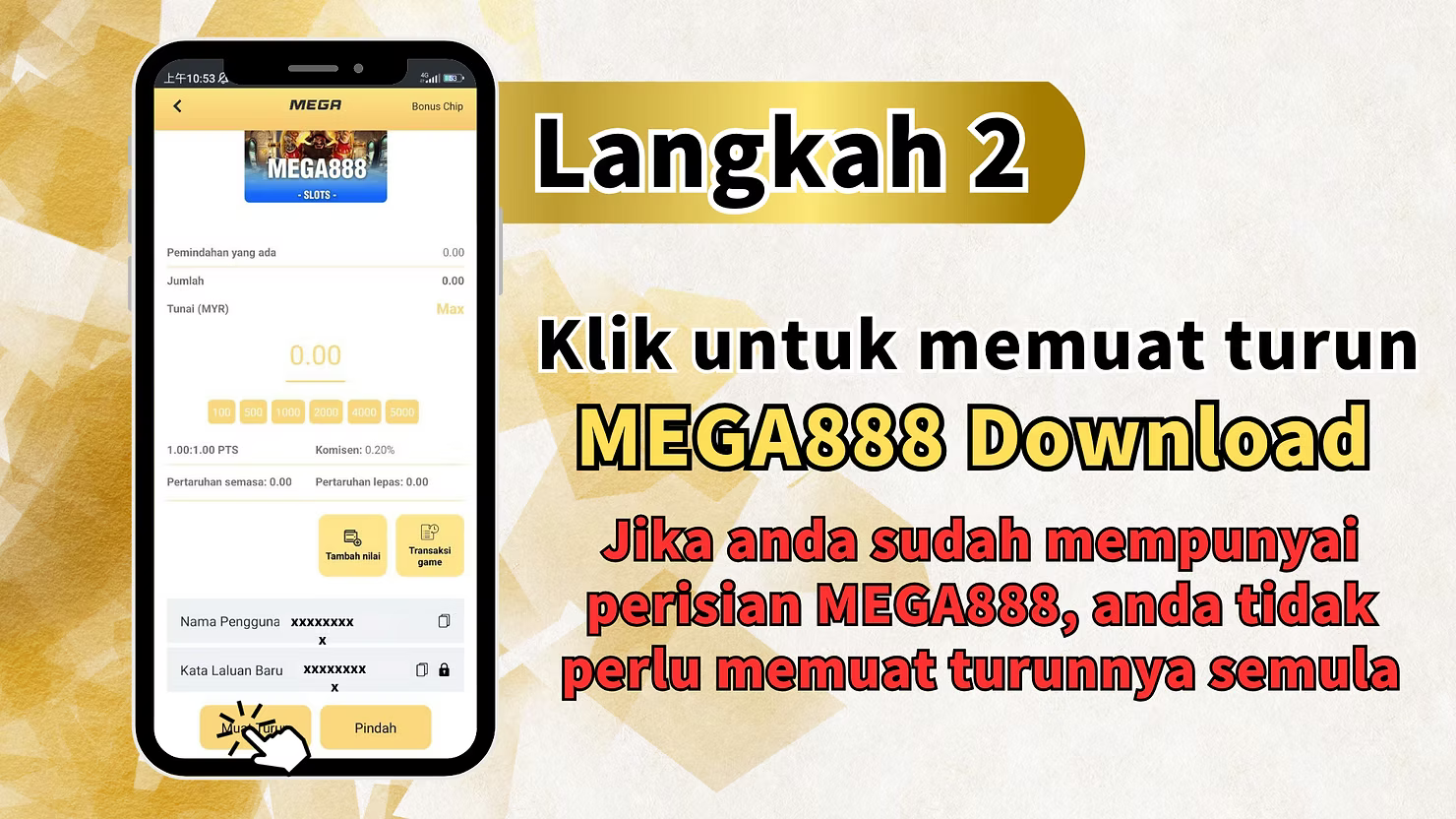
Step 2: Check If You Already Have MEGA888
If you already have the MEGA888 software installed on your device, you do not need to download it again. Simply proceed to launch the game.
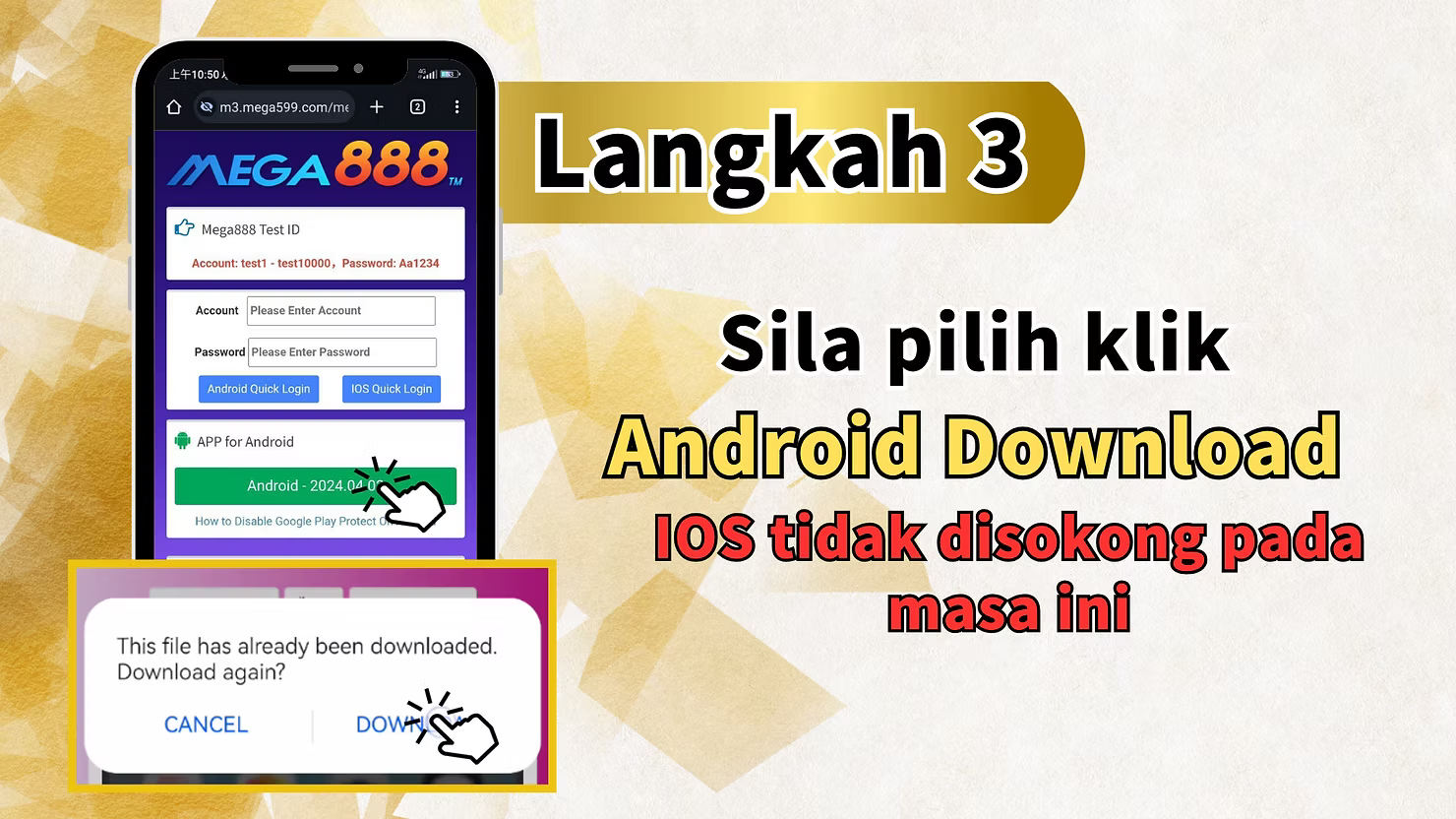
Step 3: Download MEGA888 (If Needed)
If you don't have MEGA888 installed, click the "MEGA888 Download" button. Select "Android Download." Note that iOS is not currently supported - Android users only at this time.
Before downloading, you may want to review "How to Disable Google Play Protect" to ensure smooth installation.
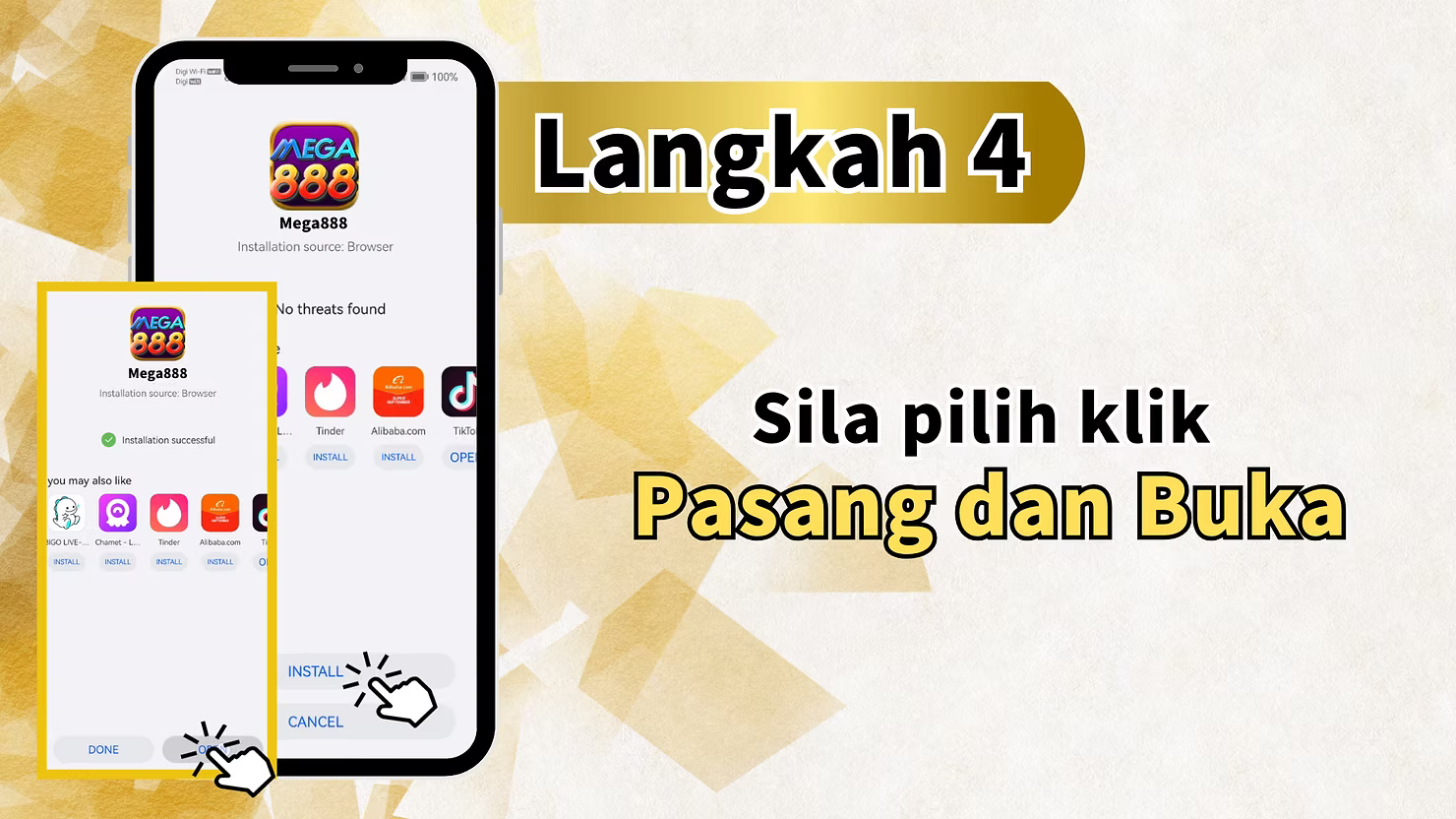
Step 4: Install the Application
Once the download is complete, locate the APK file on your device and click "Install." After installation, click "Open" to launch the MEGA888 app.
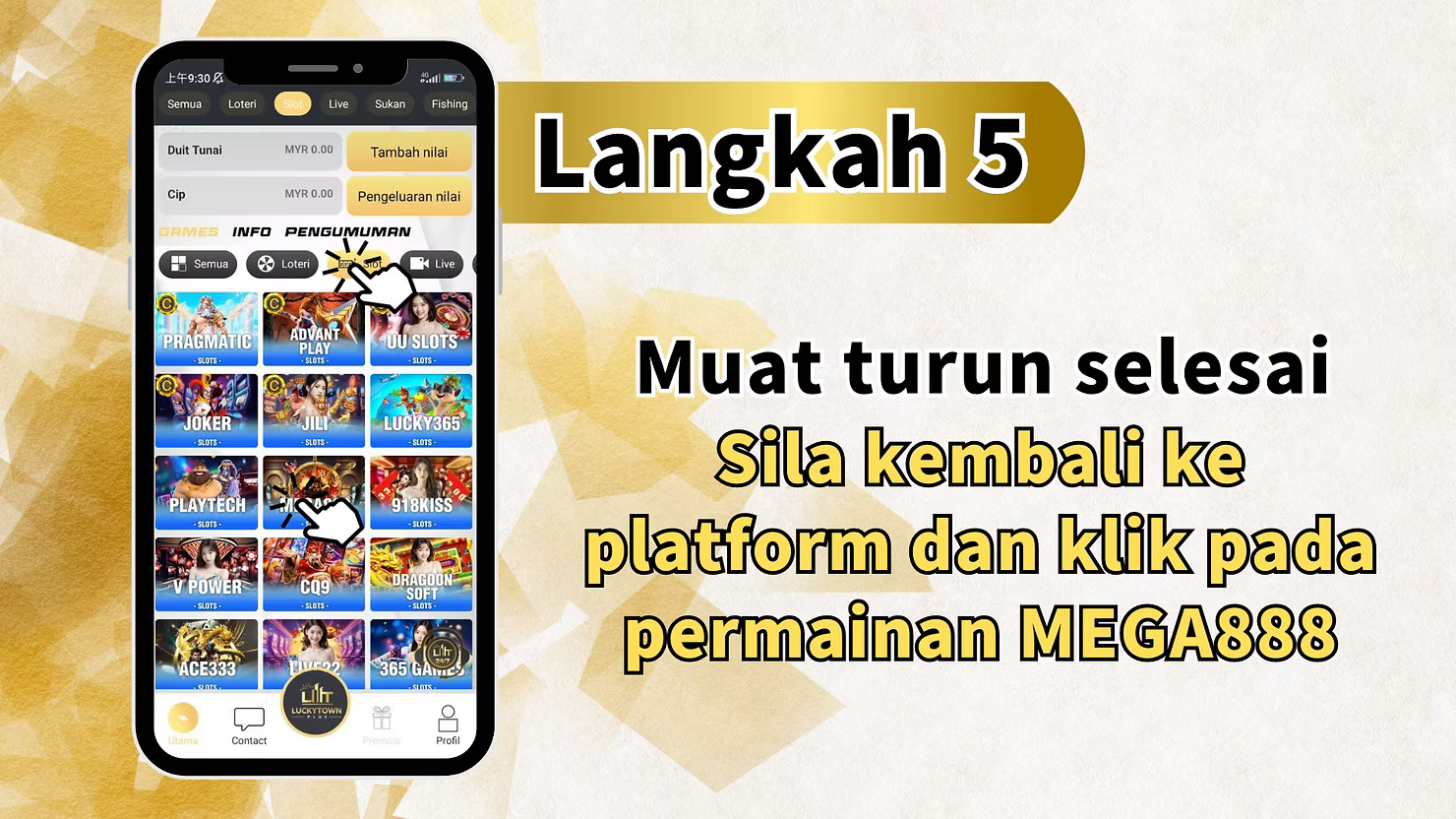
Step 5: Return to LUCKYTOWN PLUS
After the download and installation are complete, return to the LUCKYTOWN PLUS platform. Click on "MEGA888 game" again to proceed with login and fund transfer.
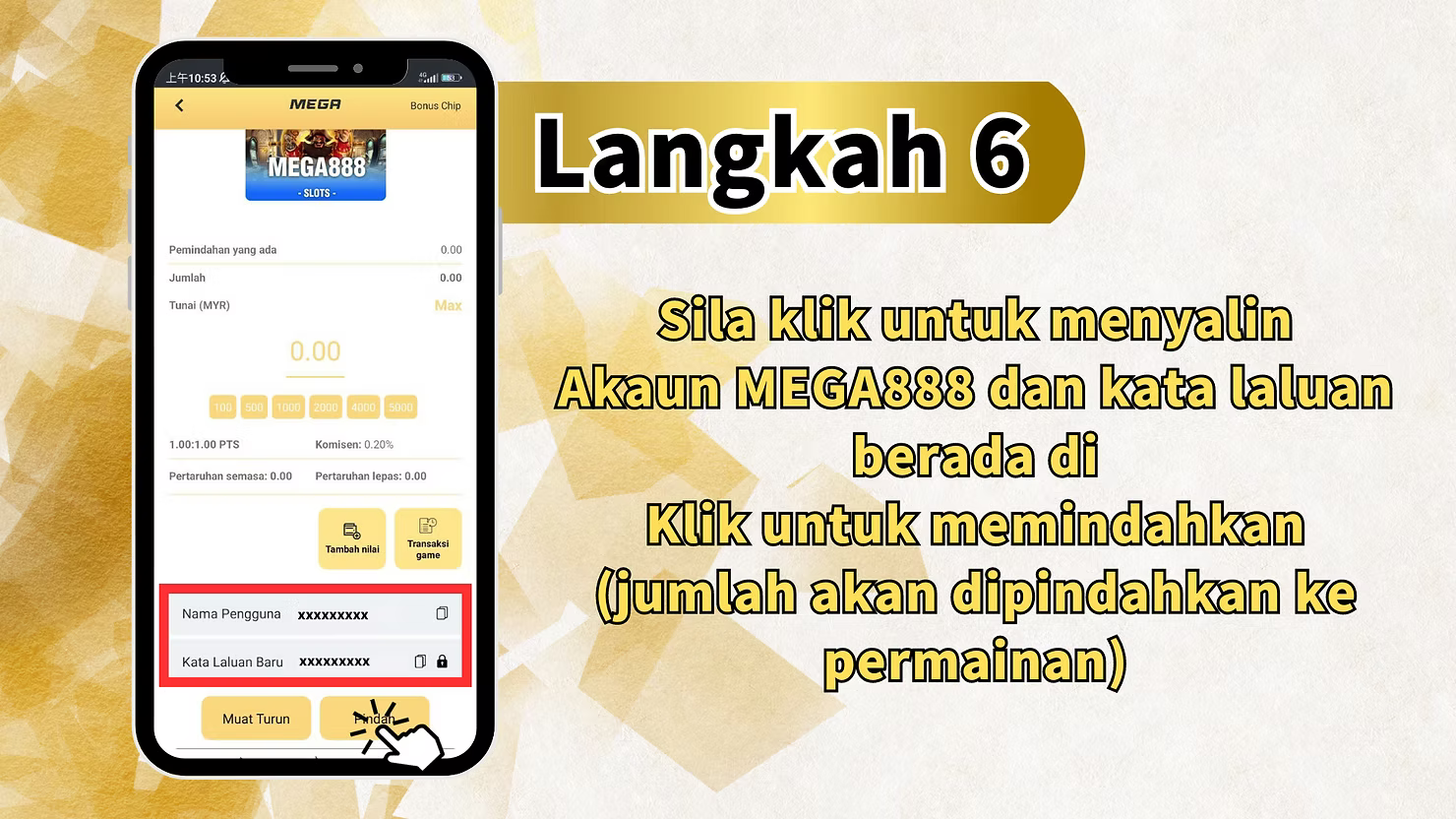
Step 6: Copy Account Credentials
On the MEGA888 game page, you'll find account information. Click to copy the MEGA888 account and password.
Test accounts available range from test1 to test10000 with password: Aa1234. You can use these for testing or use your own account.
Step 7: Transfer Funds
Click "Transfer" to move funds from your LUCKYTOWN PLUS account to the MEGA888 game. The amount will be automatically transferred and ready for use.
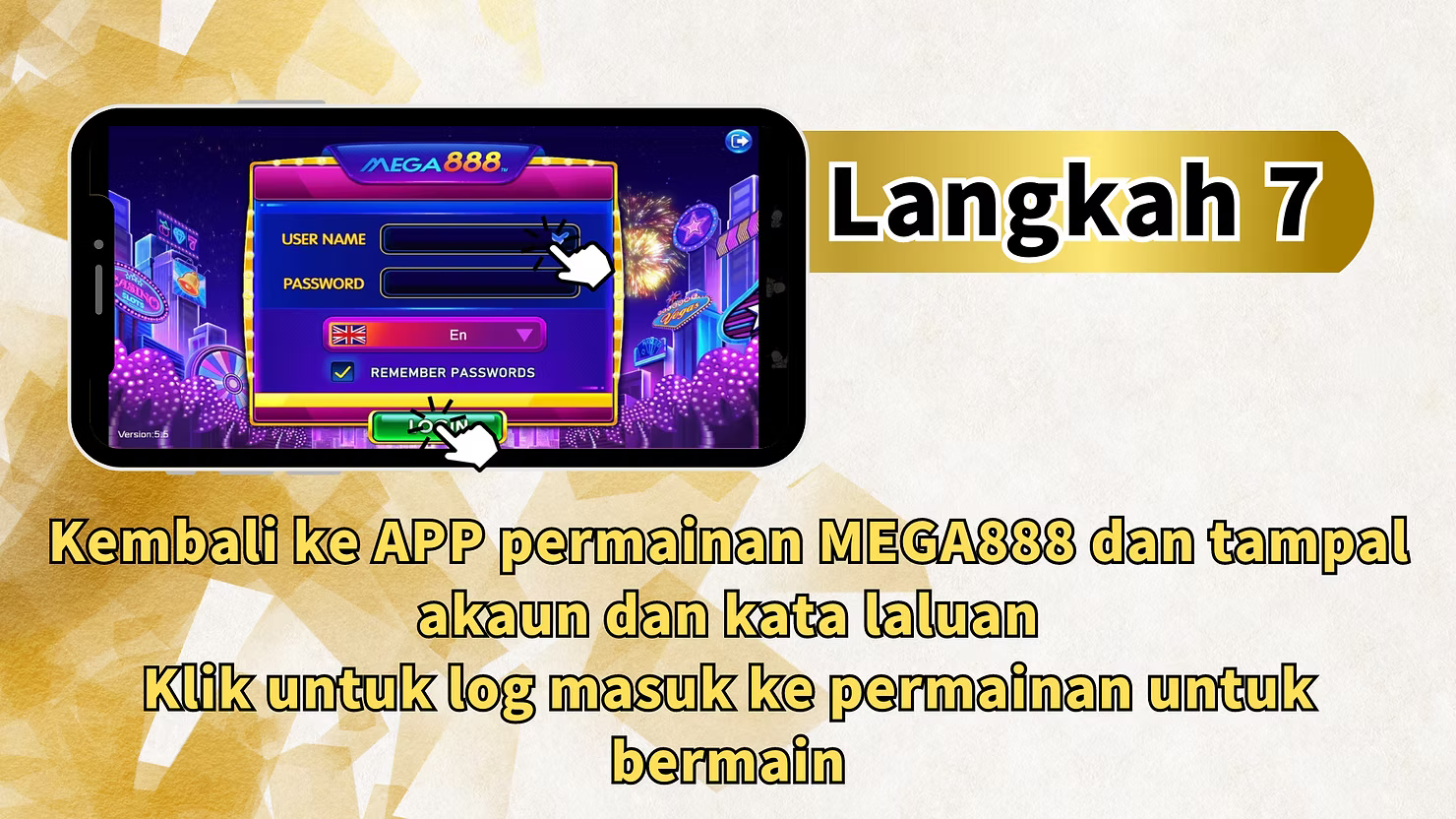
Step 8: Log In to MEGA888
Return to the MEGA888 app. Paste the account and password you copied earlier into the login fields.
Account: Enter the copied username. Password: Enter the copied password (Aa1234 for test accounts).
Step 9: Start Playing
Click "Login" to access the MEGA888 game lobby. Your funds are already available, and you can start playing your favorite slot games immediately.
MEGA888 Test Account Information
Test Account Details
MEGA888 at LUCKYTOWN PLUS provides test accounts for practice:
- Accounts: test1 through test10000
- Password: Aa1234 (same for all test accounts)
- Use these to explore games before playing with real funds
Quick Reference Summary
MEGA888 Access Steps
Login - Slot/MEGA888 - Already installed? - If no: Download Android - Install - Return to platform - Copy account and password - Transfer funds - Open MEGA888 app - Paste credentials - Login - Start playing
Important Notes for MEGA888
Android Only
Currently, MEGA888 download at LUCKYTOWN PLUS is supported for Android devices only. iOS is not supported at this time.
One-Time Download
You only need to download the MEGA888 software once. After installation, you can launch the game directly without downloading again.
Google Play Protect
You may need to disable Google Play Protect temporarily to install the MEGA888 APK. Instructions are available on the download page.
Manual Login Required
Unlike some other games, MEGA888 requires you to manually paste your account credentials after launching the app.
Frequently Asked Questions
What is MEGA888?
MEGA888 is a popular online slot game platform in Malaysia offering hundreds of slot games, fishing games, and table games.
Do I need to download MEGA888 every time?
No. Download and install once. After that, you can launch the app directly without reinstalling.
Is MEGA888 available for iOS?
Currently, MEGA888 download at LUCKYTOWN PLUS is for Android only. iOS is not supported at this time.
What are the test account details?
Test accounts range from test1 to test10000 with password Aa1234. Use these to try games before playing with real funds.
How do I transfer funds to MEGA888?
After copying your account credentials, click "Transfer" on the MEGA888 game page. Funds will be automatically moved to your game account.
Do I need a separate MEGA888 account?
No. You can use the test accounts provided or your credentials will be linked to your LUCKYTOWN PLUS account.
What if I already have MEGA888 installed?
If you already have the software, simply click "MEGA888 game," copy credentials, transfer funds, and log in. No need to download again.
Why do I need to disable Google Play Protect?
Google Play Protect may block installation of APKs from outside the Play Store. Disabling it temporarily allows smooth installation.
What games are available on MEGA888?
MEGA888 offers hundreds of slot games, fishing games, and classic casino games including Great Blue, Safari Heat, and many more.
Who do I contact for MEGA888 issues?
For any issues with MEGA888 download, installation, or gameplay, contact LUCKYTOWN PLUS customer support for immediate assistance.
Start Playing MEGA888 Today at LUCKYTOWN PLUS
Ready to enjoy hundreds of exciting slot games? Follow our step-by-step guide to access MEGA888 at LUCKYTOWN PLUS. Download for Android, use test accounts, and start winning today!
Play MEGA888 at LUCKYTOWN PLUS